

Most health systems still treat mobile as an afterthought. Patients and staff juggle clunky portals, phone trees, and paper forms, which pushes many founders to build something better. Healthcare mobile app development allows you to create a unique app of your own that transforms scattered tasks into one fluid mobile experience.
At Aloa, we work with hospitals, clinics, and healthtech startups that want custom apps built around real clinical workflows. Our US-based product leads and vetted global engineers design, build, and support mobile apps that connect to EHRs and respect HIPAA requirements. We focus on simple, usable experiences for patients and care teams.
In this guide, we break down the main types of healthcare apps, must-have features, compliance and security basics, and a realistic build process from idea to launch. You'll end up with a clearer picture of what is required and come up with the next steps.
TL;DR
- Mobile often gets deprioritized in healthcare. A good mobile app should enable key users to perform tasks such as scheduling, messaging, and follow-ups without complicating the user experience.
- There are three main user groups: apps for clinicians, apps for patients, and apps for internal operations. All three must integrate with your EHR or core systems.
- Strong healthcare apps should focus on a (very) limited set of useful features, a mobile-friendly design, and HIPAA compliance.
- The right development partner brings real healthcare experience, strong security skills, and clear guidance. A partner like Aloa can help you plan, build, and launch a mobile app that fits your clinical workflows and your patients.
What Is a Healthcare Mobile App?
A healthcare mobile app is a phone or tablet health app that uses data from the device or connected tools to support tasks like diagnosis, monitoring, treatment, or scheduling. Healthcare mobile app development turns these ideas into simple, secure tools that patients, clinicians, and staff can use in daily life.
Most apps live inside a bigger digital setup with EHR systems, billing, telehealth, and sometimes mobile health wearables. Your challenge is to hook a new app into that stack without breaking workflows or adding extra logins.
To plan your build, it helps to group apps by who uses them and what they support. Most ideas fall into three main groups:
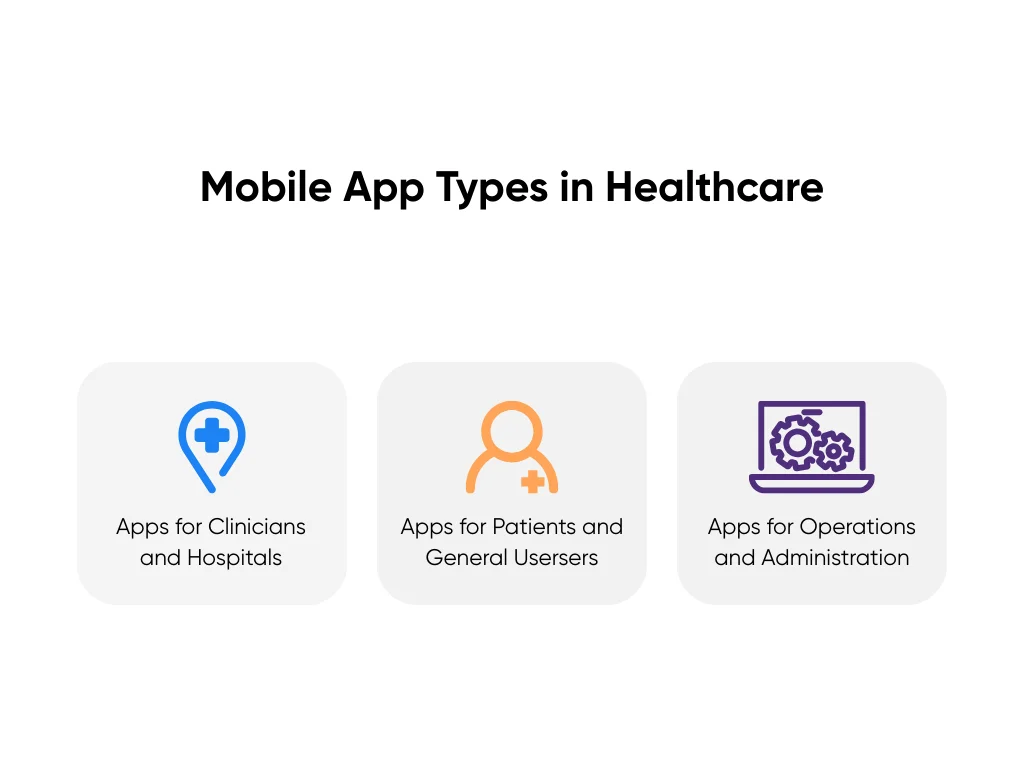
Apps for Hospitals and Healthcare Professionals
Apps for hospitals and clinicians give doctors, nurses, and support staff quick access to patient data and health records during care. They show charts, labs, images, and other medical data and orders, and often support secure messaging through tools like Epic Haiku, Cerner PowerChart Touch, or TigerConnect. There's still space for focused apps that cut documentation time, pull data into one screen, and support quick bedside choices.
Apps for Patients and General Users
Patient-facing apps live on the patient’s phone and support care between visits. They handle booking, reminders, video calls, test results, visit notes, and tracking meds or symptoms, often through patient portals like MyChart or telemedicine apps such as Teladoc. New apps can better support complex chronic disease, several providers, and people with limited digital skills, especially when they work on slow networks and support local languages.
Apps for Operations and Administration
Operational apps support staff who manage schedules, shifts, supplies, billing, and daily coordination and basic practice management. A charge nurse might approve swaps in a mobile scheduling tool like UKG Workforce Central while supply staff use scan-based inventory apps tied into your main system. There's growing need for mobile tools that use live data to forecast staffing, catch overtime risk early, and keep supply levels balanced across sites.
When we plan projects at Aloa, we help you identify your main user base, often as one of the above, so you’ll have a clear starting point for your app.
Benefits of Healthcare Mobile Apps
Healthcare mobile apps help you run care on the same mobile devices people already use all day. They cut small bits of friction across your system and make it easier for patients and your staff to do their part. When designed around real workflows, they connect scheduling, messaging, visits, and follow-ups into one flow your team can see and act on.
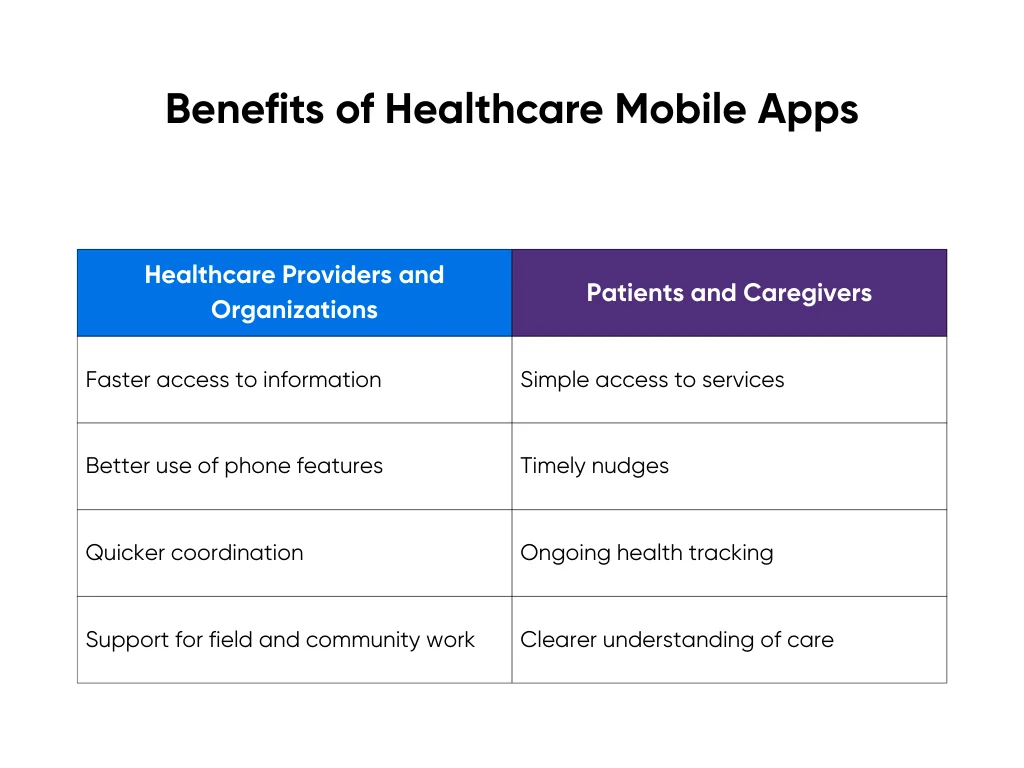
Benefits for Healthcare Providers and Organizations
For providers, strong mobile tools extend the systems you already have into the places where work actually happens. That means:
- Faster access to information: Clinicians can check charts, labs, meds, images, and medical records from the hallway, the home visit, or the ambulance bay.
- Better use of phone features: Staff use the camera for wound photos, the mic for quick notes, and barcode scanning for meds, samples, and supplies.
- Quicker coordination: Secure messaging and alerts reach the right person without hunting for a workstation or calling the front desk.
- Support for field and community work: Outreach teams document visits and collect data on-site instead of writing notes on paper to type in later.
These gains don't replace your EHR or core systems. They make those systems more useful in real life, where people move, get interrupted, and need information in seconds.
Benefits for Patients and Caregivers
For patients and caregivers, a mobile app keeps care close between visits:
- Simple access to services: People can book visits, request refills, and send non-urgent questions without waiting on hold.
- Timely nudges: Push reminders help with meds, exercises, monitoring, and follow-up visits so tasks feel smaller and more manageable.
- Ongoing health tracking: Apps pull healthcare data from wearables and home devices, such as steps, heart rate, and weight, and let people log pain, mood, sleep, or symptoms in real time.
- Clearer understanding of care: Patients can review visit summaries, lab results, and care plans when they're calm, not rushed in the exam room.
Over time, this steady stream of real-world data gives your team a fuller picture of each person. If you want to go further with that data, you can layer in AI-supported features, like the ones we outline in our guide on the concrete benefits of AI for patient care, to support triage, monitoring, and tailored education.
Essential Features and Requirements in Healthcare Mobile App Development
Once you know who the app is for, you need to decide what it must do on day one. Good healthcare apps get three things right at once: useful features, a mobile-first experience, and strong security.
Core Functional and UX Features Every Healthcare App Needs
Many founders try to cram every feature into their first release, which tends to make the user experience unnecessarily confusing. Users really just need quick and consistent access to information, simple ways to communicate, and clear action steps. This applies to web interfaces, but is particularly important for mobile apps.
Most apps start with:

- Secure login and profiles with access controls so each user sees only their own health information and patient information.
- Appointments and care tasks for booking, appointment scheduling, rescheduling, and checking prep or follow-up steps.
- Messaging or telehealth so patients and clinicians can connect without phone tag.
- Notifications and reminders for meds, check-ins, results, and upcoming visits.
Mobile design matters here. Patients and clinicians use these apps on the move, often with one hand and limited attention. A good interface should highlight the most important actions first. Clear labels, large touch areas, and simple error messages help users complete tasks without second-guessing.
Be sure to test out the mobile experience with those who will be using it. This crucial step would uncover issues such as weak signal, older devices, or other conditions that may not have been considered in the app's initial design.
Compliance, Security, and Infrastructure Essentials
Any app that touches patient data needs data security and privacy planned from the start. That includes HIPAA compliance, GDPR, and local regulatory compliance, along with clear decisions about where data lives and how it moves. BMC Medicine research shows how missing these steps can delay launches or limit adoption.
Mobile adds risk because phones get lost, shared, and used on public networks. You reduce that risk with strong authentication, role-based access, data encryption, audit trails, and fast ways to revoke access on a lost device.
You can work with partners like Aloa, who built a HIPAA-safe transcription app. An experienced partner can help you shape a security approach that protects patient data from day one.
Step-by-Step Healthcare Mobile App Development Process
A healthcare mobile app works better when your development team builds it in stages, just as you would build any other app. You learn what works vs. doesn’t, fix issues early, and avoid spending your whole budget on guesses. In healthcare, a single missed detail can disrupt workflows, compromise compliance, and erode patient trust.
At Aloa, we usually follow four steps: strategy, proof of concept, production build, then scale. Each step has a clear goal and a clear “go or adjust” moment.
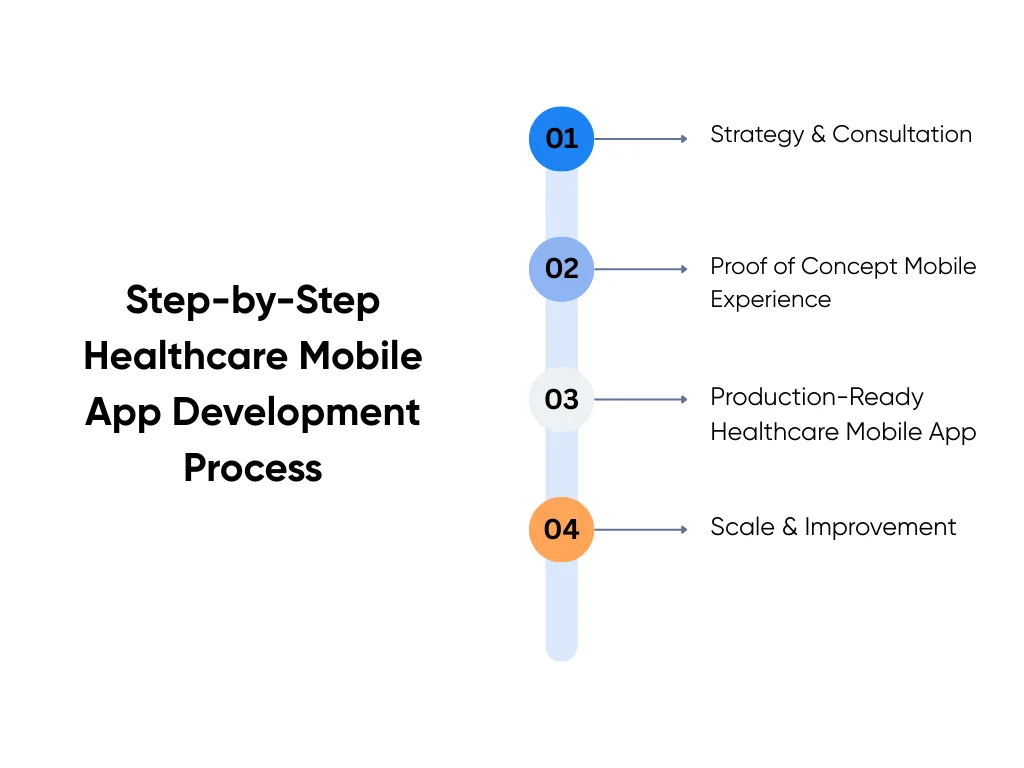
1. Strategy & Consultation
This is the starting line. We get clear on the problem you’re trying to solve, your users, and the type of app you need. Whether it serves patients, clinicians, or staff changes the choices you make later.
Together, we map the systems you already use, like EHR, scheduling, billing, and telehealth. We call out the hard parts early, such as data syncing, role-based access, and shared devices.
Then we sketch a concrete flow. Say you want a post-visit app where patients log symptoms for two weeks and get simple check-in questions. Their answers feed into your EHR, trigger alerts for nurses, and follow clear rules about who can see what.
We also decide where AI, automation, or analytics fit. We ask simple questions: what task should the app speed up, and what data can you safely use to do that?
2. Proof of Concept (PoC) Mobile Experience
A proof of concept is a short test drive that acts like a minimum viable product for your idea. You build a small but real version of the app to prove the core flow works in real life, usually in 6-8 weeks.
For the post-visit symptom app, the PoC might cover one clinic, one condition, and a small patient group. Patients complete daily check-ins, and nurses view a simple dashboard or inbox with the responses. You test whether data lands in the right EHR fields, alerts fire correctly, and no one sees data they shouldn’t.
This step saves money later because it surfaces problems while the scope is small. It also helps you win support from clinical and operations teams, since they can tap through the app instead of reading about it.
3. Production-Ready Healthcare Mobile App
When the PoC works, you move into the full build. Here, you finish the feature set and make the app stable enough for daily use.
With the symptom tracking app, the production build adds full login, consent screens, and stronger security checks. We finish the EHR integration so results land in the right chart fields and add an alert inbox for nurses. We also plan app store or internal rollout, plus clear training and help content for your teams.
Timelines depend on scope, but many builds land around three to four months. The goal is a reliable app that holds up when more patients, clinicians, and sites start using it.
4. Enterprise Scale & Continuous Improvement
After launch, some teams pause. Others keep going because mobile becomes part of how they deliver care and run operations. For the symptom app, this phase might expand from one clinic to the whole network and add more conditions. You can also plug in better analytics so leaders see trends by site and population.
You can also expand AI features once the basics are stable, such as smarter message routing or better remote monitoring signals. Launch gives you a baseline; real usage tells you what to improve next.
With this staged approach, you stay in control. You learn what works, adjust before problems grow, and build a mobile app your teams and patients actually use.
How to Choose the Right Healthcare Mobile App Development Partner
Choosing a healthcare app development company is an important step. You want a team that has built real healthcare software and mobile applications, not just generic tools.
Regulatory and security skills are non-negotiable. Ask how they work with HIPAA, GDPR, and PHI on mobile, including lost or shared phones, and what security testing and best practices they follow. A strong partner will walk you through a clear process from consultation to proof of concept, then into production and scale, rather than jumping straight to recommending a big build.
You can ask simple questions like “What healthcare mobile apps have you shipped, and can you share case studies?” or “How do you handle mobile security in practice?” and “What does support look like after launch?” Asking good questions is a crucial part of vetting partners.
At Aloa, we are experts in AI-powered healthcare mobile app development. Our developers and product leads design apps that connect to your EHR and keep HIPAA needs front and center. We apply the same guardrails from our HIPAA safety guide for AI models. Your app fits your systems and workflows while still protecting patient data.
Key Takeaways
A strong medical app is no easy feat. Even if you have big ideas and industry knowledge, you must narrow down the features you want to one single thing that sets your app apart from others. From there, you only need a small set of useful features for it to be successful. The tough part is ensuring you have a smooth mobile flow and an excellent security framework.
The most common mistake that we’ve seen is trying to ship every idea in the first version. That usually leads to crowded screens, slow performance, and compliance gaps that are hard to untangle later. When you focus on one clear workflow and add features over time, you get a safer, cleaner app that people actually use.
If you're exploring healthcare mobile app development with a specialist partner, we'd be happy to help. At Aloa, we pair healthcare-focused product leads with vetted engineers and support you from early planning through launch and beyond. You can talk to our team to map out a clear next step for your organization.
FAQs about Healthcare Mobile App Development
How much does healthcare application development cost?
Cost still depends on scope, but you can use a few rough ranges. A simple patient app with a handful of screens and one or two integrations might land around the low five figures. A multi-role app with EHR links, telehealth, and analytics usually moves into the six figure range.
On our side at Aloa, proofs of concept often fall in the $20K to $30K range, full production builds usually land between $50K and $150K, and complex, enterprise-scale projects with multiple systems can reach $150K to $300K or more. You can see current tiers on our AI and app development pricing page.
How long does it take to build a healthcare mobile app?
Your MVP usually takes a few months from strategy to launch. Bigger apps with complex workflows, EHR integrations, or remote patient monitoring device data can take longer. Timing depends on how fast your team makes decisions, how tricky the integrations are, and how many review steps you need. A good partner will break the work into phases.
What are the biggest risks when building a healthcare mobile app?
The big risks are weak data protection and compliance planning, low user adoption, painful integrations, and scope creep. You can manage them by planning for HIPAA and privacy rules from day one, involving clinicians and patients in testing, running small technical proofs with EHRs, and using phased delivery with clear priorities. Working with a team that already builds healthcare apps lowers these risks a lot.
How is healthcare app development different from building a regular app?
Healthcare apps handle sensitive health data and are closely tied to clinical work and treatment plans. The stakes are higher than with most consumer apps. They must meet rules like HIPAA or GDPR and handle consent, audit logs, and data access correctly.
Also, they usually integrate with EHRs and other hospital systems without breaking existing workflows. That raises the bar for reliability, security, and UX, so it helps to work with a partner who understands both software and the realities of care settings.
Should we build our healthcare app in-house or work with a specialized partner?
In-house gives you direct control if you can recruit those with mobile, security, and integration skills. However, this often involves training and a longer-term timeline. A specialized partner can potentially move faster and bring in the exact skill sets that you need over a short period of time. Think of it as a trial run for a full-time hire. It gives you the flexibility to scale up or down as your app matures.
If you are not sure which path fits you, you can talk to our team at Aloa for a short, free consultation. We match you with vetted healthcare mobile app developers and product leads so you can move forward with the right mix of in-house and external help.