
Choosing an AI model sounds simple until you try to compare LLM vs SLM. Every source says something different, models change fast, and it's hard to know which choice will hold up once you start building. You want a setup that fits your actual workload, not a guess based on noise online.
At Aloa, we design and build the full AI system with your team, so you don’t have to juggle vendors or guess which model setup fits your needs. We help you sort this out early, before it turns into an expensive mistake. We look at your goals, your data, and how your team works, then map a model strategy that fits your actual environment.
This guide breaks down large and small language models in simple terms. You'll see where each one works well, where it struggles, and how to choose the model strategy that fits your goals.
TL;DR
- LLMs do the heavy lifting. They handle the messy, mixed questions your team asks every day, which is why they power most production systems.
- SLMs are quick and cheap to run because they use fewer parameters. But they only work well when the task is simple, stable, and doesn’t require much reasoning.
- The best choice comes from the workflow itself: the data it touches, the accuracy you need, and how fast the tool has to respond.
- Many strong setups use both, with the LLM handling the thinking and a small model handling firm rules.
- If you want help choosing the right setup, Aloa can look at one workflow with you and show which model strategy fits best.
LLM vs SLM at a Glance
LLMs are larger models trained on massive data sets using deep learning techniques and can take on much more complex work. SLMs are smaller models built for tight, specific tasks and low compute. The LLM vs SLM choice often comes down to cost, accuracy needs, speed, computational requirements, and where your system will run.
It helps to see the two side by side. The differences feel clearer when you look at how they behave in your workloads:
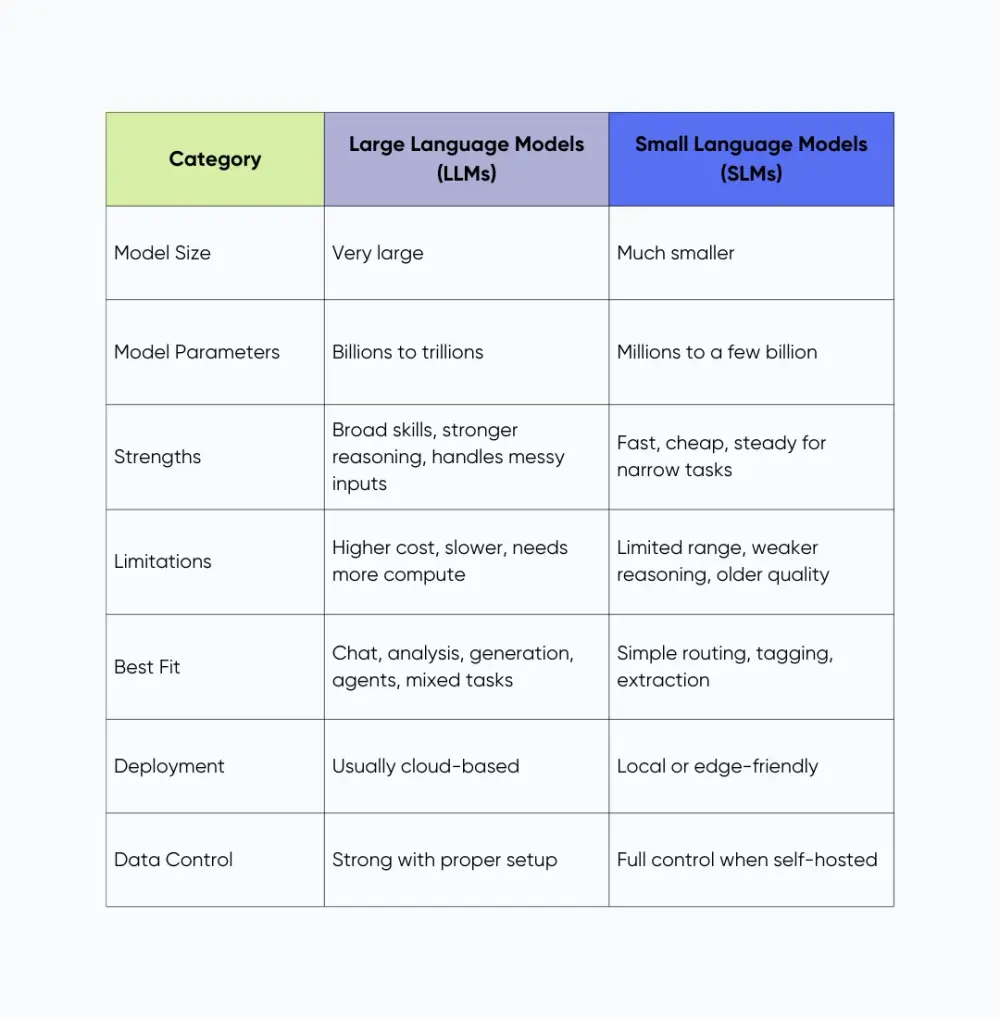
On paper, both options look fine. In practice, the gap in accuracy and flexibility is noticeable. LLMs handle real-world messiness, which saves time when your workflows shift or your data isn’t clean. SLMs feel light and budget-friendly, but they only hold up when the task is simple and stable. Many teams start with “small model first” thinking it will cut costs, then run into accuracy issues that stack up as engineering work.
You can understand the gap better by looking at how each model performs across a few key areas.
Comparison #1: Model Scope, Data, and Accuracy
Scope and data decide whether a model handles your real work or falls apart once it leaves the happy path. Some tasks need broad knowledge. Others need tight, repeatable answers.
Breadth vs Depth of Knowledge
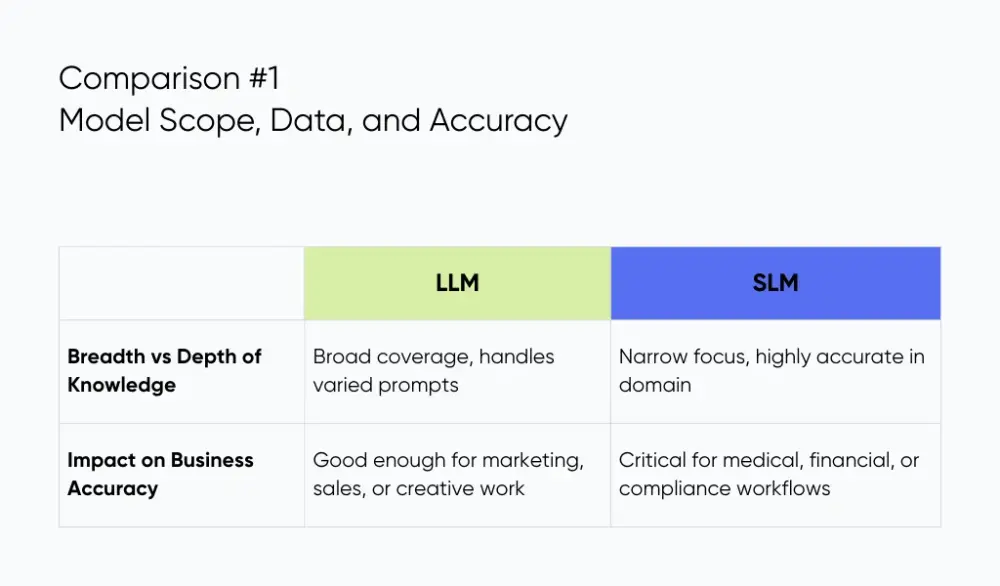
LLMs learn from huge and messy data sets, including public web pages, code, and documents. That wide mix helps them handle prompts that jump around. Think of a single chat where you ask for a product spec, a bit of sample code, and a summary for your sales team. A large language model can usually follow along without switching tools.
SLMs work more like specialists focused on specific task domains. They're usually trained on smaller and more curated text and fine-tuned on domain material like claims rules, clinical notes, or internal policies. Inside that lane, they can be very sharp and avoid random guesses. For example, an SLM tuned on your bank’s risk rules can label transactions “review” or “ok” all day with steady behavior. Ask it to write a thought-leadership blog, though, and it starts to struggle.
So you trade range for focus. LLMs give you broad coverage. SLMs give you tight control in a narrow space.
Impact on Business Accuracy
Accuracy means different things across your company. For marketing ideas, landing page copy, or sales outreach drafts, “good enough” is fine because a human will edit the final text. A few off phrases don't break the business.
For medical documents, financial workflows, or compliance summaries, the bar rises. A wrong drug instruction, a misread contract clause, or a bad tax note can cause real harm. Here, a domain-tuned SLM or a hybrid setup that wraps an LLM with strict prompts, retrieval, and checks makes more sense.
At Aloa, we map your key workflows and mark where errors hurt the most. From there, we decide where a broad LLM fits, where a focused SLM helps, and where you need both working together. That way, your model choices follow your accuracy needs.
Comparison #2: Performance, Latency, and User Experience
Performance shapes how people judge an AI tool. If it answers fast, your team keeps using it. If it lags, adoption drops, even if the model is accurate. Latency, hardware needs, and throughput all affect day-to-day use.
Hardware, Speed, and Concurrency
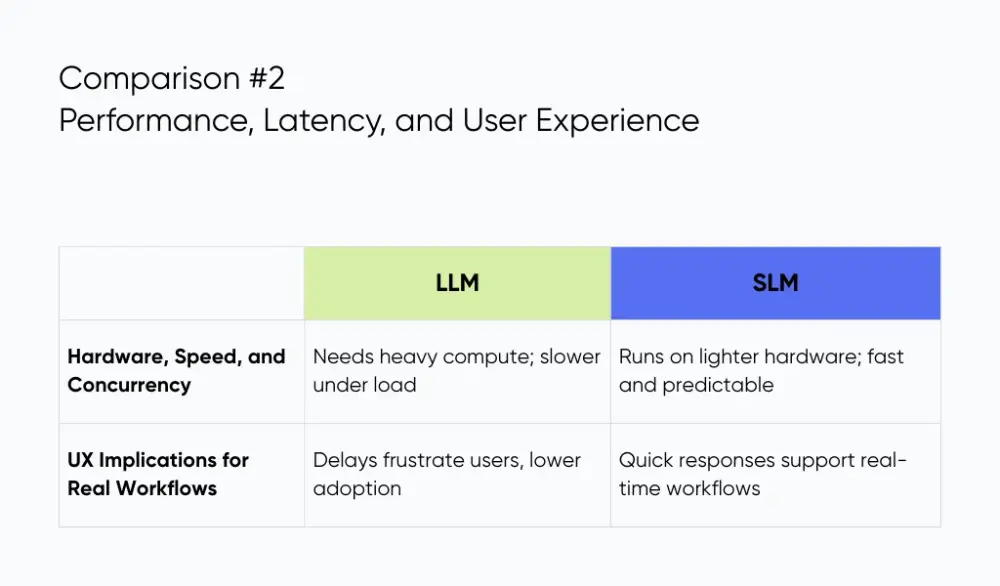
LLMs usually need significant computational power. Bigger models take longer to respond, especially when prompts are long or several users hit the system at once. Picture a support dashboard where agents ask the model to summarize a ticket. A long answer or a slow GPU queue means the agent waits instead of helping the next customer.
SLMs run on lighter hardware. Many can run on CPUs, small clusters, or edge devices. This smaller footprint often gives predictable and quick responses. Think about a warehouse app that needs to classify items or read short notes from handheld scanners. A small model can process those requests fast without stressing your servers.
UX Implications for Real Workflows
Speed matters most when people use the tool inside their normal systems. A sales rep inside the CRM expects a near-instant draft reply. A two or three-second delay feels long enough to skip the feature. A nurse using an EMR assistant needs chart details right away, not after a pause that breaks their focus.
Latency grows fast in multi-step flows. If an agent calls three tools in a row and each step adds a second, the whole process feels slow. That delay breaks trust and lowers usage, which hurts the return on the entire project. Teams that plan smoother AI operations avoid this, and they keep the system stable as workloads grow.
Comparison #3: Infrastructure, Cost, and Total Cost of Ownership
Cost is more than a token price. It includes how often the model gets used, what hardware it runs on, and what it costs to support it for a year or two. Seeing these numbers early helps you budget and avoid surprise overruns.
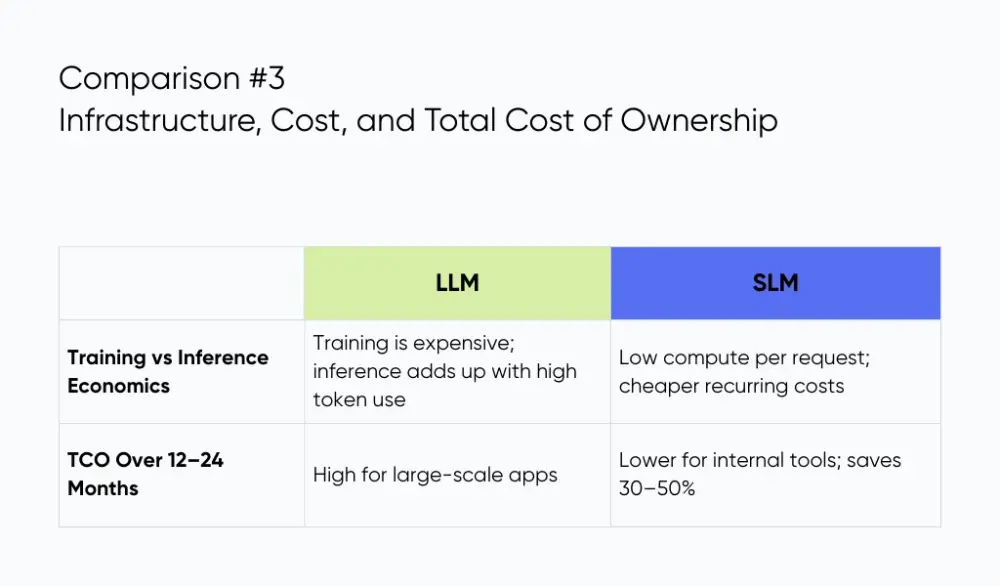
Training vs Inference Economics
Most teams won’t train a big machine learning model from scratch. Training a cutting-edge LLM can cost millions in cloud GPU hours. The real spending comes from inference, which is every query your app makes. For example, some top LLM APIs charge around $1.25 per million input tokens and $10 per million output tokens for high-end models. That adds up fast once you handle thousands or millions of tokens daily.
SLMs use much lighter compute per request. Say your support team uses a model to classify short text or tag incoming tickets. An SLM can run on smaller hardware with lower compute needs, which keeps recurring costs down compared to a big model handling long, complex text every time.
TCO Over 12–24 Months
Here are two examples:
- Global customer assistant: If your product assistant answers millions of chats each month, the LLM costs accumulate. If each chat uses 200K tokens and you have 1M chats, that’s hundreds of dollars every month just in token fees unless you optimize.
- Internal copilots for ops or finance: If these tools run hundreds of thousands of short requests per month, a smaller model or hybrid setup can cut ongoing inference costs by 30–50% because each call uses far fewer tokens.
Where you host the model matters too. Cloud providers charge for compute and data transfer. On-prem hardware comes with upfront costs like GPUs and cooling plus ongoing maintenance. At Aloa, we map out these spending curves early and design your architecture so costs scale predictably rather than balloon unexpectedly.
Comparison #4: Privacy, Governance, and Regulatory Risk
Privacy shapes what you can safely automate. When teams handle patient notes, financial data, or internal documents, they need to understand exactly where that data goes and how the model treats it.
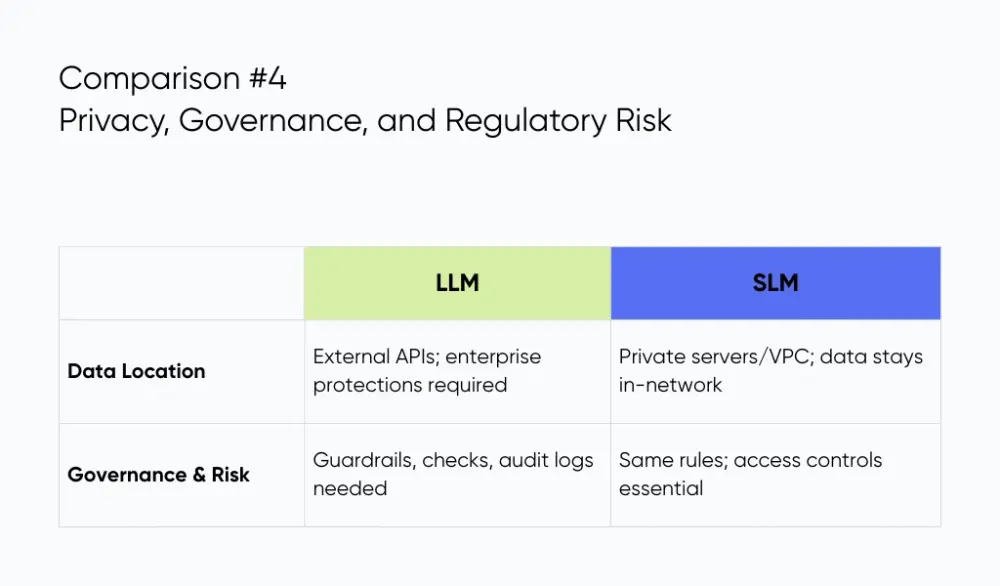
Where Does Your Data Actually Live?
LLMs that run through third-party APIs process prompts on external systems. Even with enterprise controls like encryption and data retention limits, your security team still needs to confirm how logs are handled and whether any data is stored for model improvement. Microsoft notes that hosted models now offer stronger enterprise protections, but due diligence is still required.
SLMs stay closer to home. Many companies deploy them inside a private VPC or on local servers so sensitive data never leaves the network. This is a common pattern in healthcare AI development and finance AI development where data residency rules are strict. A hospital might run a small model next to its EMR system so patient notes never travel across the internet.
But we usually recommend secure, HIPAA-eligible LLMs with strong protections unless your data cannot leave your physical environment at all. In those rare cases, an on-prem open-source SLM can work.
Governance and Risk Management
Both types of language models need guardrails. A bank might block account numbers in prompts, require output checks for policy language, and keep audit logs for every request. Even an on-prem SLM can misread a clause or mislabel a document, so access controls and monitoring remain essential.
At Aloa, we help teams define these rules early. We design hosting, permissions, and model evaluation checks so your AI system meets privacy requirements without slowing down daily work.
Comparison #5: Customization, Control, and Iteration Speed
Customization shapes how quickly you can update an AI tool and how consistent it feels in daily use. Both model types can be tuned, but they suit different realities.
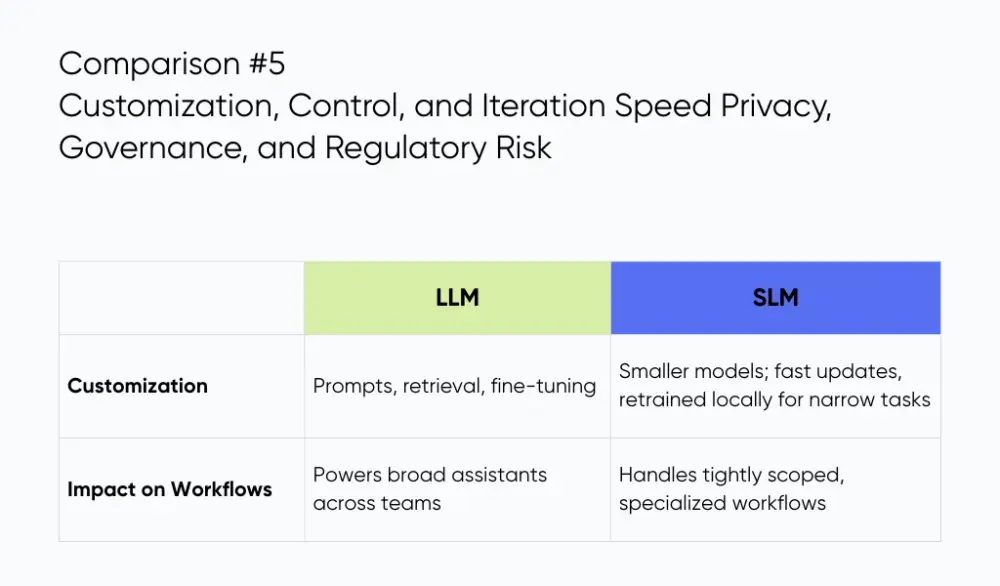
Customizing LLMs
LLMs respond well to clear instructions and thoughtful prompt engineering. A team might set rules so a support assistant writes in the company voice, follows refund limits, and avoids statements that could confuse customers. Retrieval makes this even stronger by letting the model pull answers from your own docs instead of relying on guesswork. This helps with complex tasks like explaining product features, summarizing tickets, or breaking down policies for staff.
Fine-tuning takes it a step further on top of the neural networks that power these models. Your claims team could train them on past summaries so they learn the exact phrasing your analysts prefer. This boosts accuracy across many situations. It just needs a steady process for testing new versions, tracking changes, and monitoring quality so nothing slips.
Customizing SLMs
SLMs are smaller, so updates move fast. A business might run a 3B open source model on its own servers and retrain it each week as pricing tables or approval rules change. This fits narrow tasks like tagging invoices, checking forms, or validating internal fields. Everything stays local, and the team decides exactly what the model learns.
Impact on Product Roadmaps
LLMs power broader assistants that handle various tasks across teams. SLMs fit rare, tightly scoped workflows where you manage the hardware and need constant updates. At Aloa, we lean on LLMs for nearly all production builds and bring in an SLM only when the constraints truly require it.
Comparison #6: LLM vs SLM by Use Case
It’s easier to pick a model when you tie it to the actual work your team does. Here are five common cases and what usually fits:
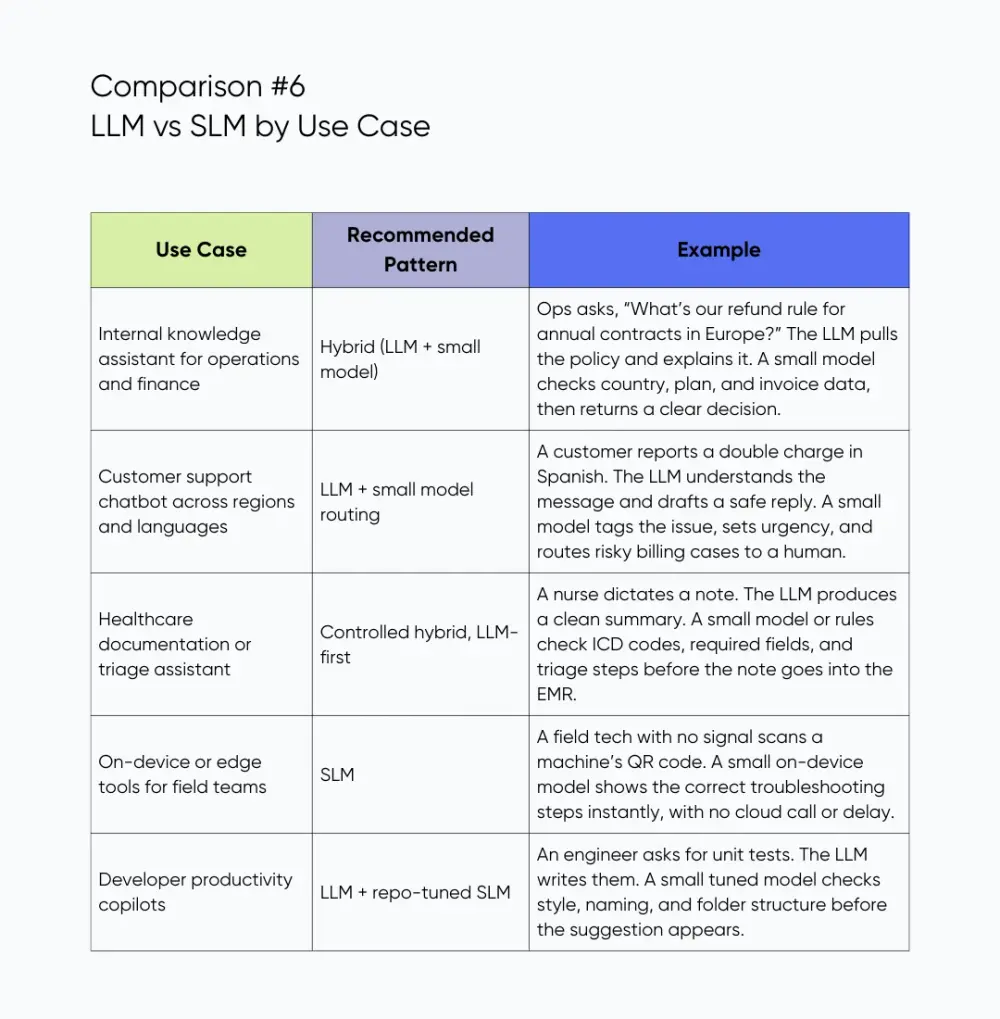
These are the kinds of assistants and workflow tools we build at Aloa. We match the model to the job so it fits smoothly into your team’s daily work.
How to Choose Between LLM, SLM, or Hybrid
To pick a model, start by listing the types of tasks and complex problems you want help with. When you focus on actual tasks instead of broad “AI goals,” the right option becomes much clearer.
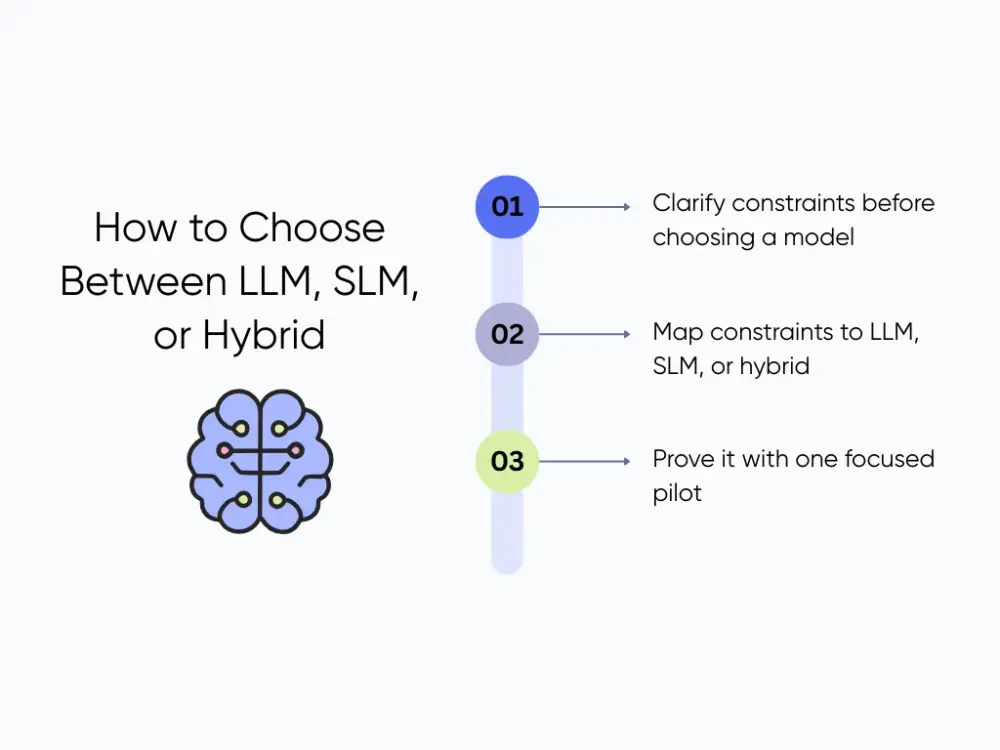
Step 1: Clarify constraints before choosing a model
Pick one workflow with real friction. If it’s invoice review, write down the data involved (vendor info, amounts, contract terms), where that data lives, and how fast people expect answers. List the mistakes you can tolerate and the ones you can’t. Mislabeling a vendor might be fine; approving a refund that breaks policy isn’t. Keeping this tight (one or two workflows) gives you a clear starting point.
Step 2: Map constraints to LLM, SLM, or hybrid
Now line up your constraints with the model patterns. If the workflow is narrow and needs fast, predictable outputs, like a field tech using a mobile checklist offline, an SLM fits. If the work involves open-ended questions, mixed topics, or multiple languages, like an internal knowledge assistant, an LLM with guardrails is usually the right call. When different teams have different needs, a hybrid setup works: the LLM handles free-form questions, and a small model handles rule-heavy steps.
Step 3: Prove it with one focused pilot
Choose a workflow with clear steps and real payoff. If finance spends ten minutes per invoice double-checking numbers and terms, measure that baseline. Build a small pilot: the LLM summarizes the invoice, and a small model or rules layer flags mismatches. Run it for a few weeks and compare time saved and error rates. This shows what actually works in your environment.
How Aloa Helps You Navigate LLM vs SLM
Aloa guides teams through these decisions with a clear stance: in almost every production system, an LLM is the stronger long-term choice. They’re more capable, easier to scale, and evolve quickly. They start from a powerful, pretrained model built on deep learning architectures that can tap into a lot of available contextual knowledge.
We use an SLM only when your data cannot leave your hardware or when a tiny, heavily fine-tuned model is the only fit. Closed cloud SLMs rarely make sense because they act like weaker LLMs without the benefits.
At Aloa, we help you map your constraints and run the pilot. Then our team can turn the results into a reliable AI system that fits your workflow today and can grow as your needs change.
Key Takeaways
There’s no single winner in the LLM vs SLM debate. The right fit comes from the workflow, not the model. LLMs handle broad, messy, mixed tasks, which is why they anchor most production systems. SLMs only make sense for narrow, stable tasks where speed, cost, or strict data locality matter.
Some setups use both, sending open questions to an LLM and rule-heavy checks to a smaller model. But real success depends on clear scoping, reliable data, and smooth integration into the tools your team already uses.
At Aloa, we focus on what works in practice. We recommend an LLM-first approach for almost every production build because it delivers stronger results and adapts as your needs grow. We only lean on an SLM when your constraints absolutely require it.
If you want help choosing the right setup, share a workflow with us or book a consultation.
FAQs: Quick Answers on SLM vs LLM
Is an SLM always cheaper than an LLM?
Not always. Imagine a support classifier that tags 2 million tickets a month. A small model on light cloud hardware might be cheaper per request than a large model. But if you decide to host that SLM on your own GPUs, you also pay for servers, cooling, and the team that maintains them. A well-tuned LLM that does more per call can end up cheaper overall than a “cheap” SLM that needs extra engineering and infra.
Can we combine LLMs and SLMs in the same solution?
Yes, and this is often the most practical setup. For example, a support chatbot can use an LLM to talk with customers, understand their problem, and draft replies. A smaller model then labels each ticket (billing, bug, feature request), sets priority, and routes it. Same with finance: an LLM summarizes an invoice, while a small model checks approval rules. At Aloa, we often design these hybrid workflows, especially in internal tools and workflow automation projects.
Which is better for regulated industries like healthcare and finance?
Most of the time, a secure enterprise LLM works best. Think of a hospital that needs help summarizing patient notes. A HIPAA-eligible LLM can turn long text into clean summaries while staying inside strict controls. An on-prem SLM only makes sense when data can never leave your network, or the task is small and fixed, like tagging a few risk labels. In finance or healthcare, we usually pair an LLM with strong guardrails, logging, and policy checks rather than betting everything on a small model.
Do SLMs match LLMs on reasoning quality?
Right now, no. A small model can do a great job on a narrow task, like tagging claims as “eligible,” “review,” or “deny” based on clear rules. But ask it to compare two contracts, spot edge cases, and explain the differences, and it starts to miss things. Modern LLMs handle that kind of reasoning much better. When our clients need deeper analysis, code review, or long-form decision support, we treat LLMs as the main engine and only add SLMs for simple side jobs.
Where should we start if we have no internal AI team?
Start with one workflow, like “reduce time spent on invoice review by 50%.” Map the data, the key steps, and what counts as a bad mistake. Then test an LLM-based pilot that reads the invoice, summarizes key fields, and flags issues for human feedback. If you want help shaping and tuning that model, our team can handle the heavy lifting through our LLM fine-tuning services. We help you pick the right base model, train it on your data, and plug it into your existing tools so you get value without hiring data scientists.