
You might have heard of this situation: Company A launches an AI tool expecting it to automate a workflow, but once real users start using it, problems surface. The model struggles with messy inputs, edge cases appear, and the workflow doesn’t match how people actually work.
Unfortunately, many AI projects run into trouble because they go straight to production. The safer move is usually to start with a small proof of concept (PoC) before investing in a full build.
Many companies weighing proof of concept vs production come to Aloa. You work directly with AI engineers who design and build the whole system end-to-end. We ship a focused PoC in 6–8 weeks on your data, then turn that same code into production software with login, logging, monitoring, security, deployments, and the stability to run every day. You stay in control with hourly pricing and a clear cap.
In this guide, we’ll walk through what changes once you move past the PoC and how to choose the level of build that fits where you are right now.
TL;DR
- A proof of concept only shows that an AI solution can work once on a narrow slice of data in a controlled setting.
- Production AI must work every day, handle messy inputs, connect to your systems, and meet security and compliance rules.
- Moving from PoC to production is its own project, with a separate scope, budget, timeline, and success metrics.
- Skipping steps like data cleanup, integration, testing, and monitoring turns PoC code into a fragile system.
- Leaders should fund the PoC to learn fast, then invest in a structured production build when the idea proves its value.
Proof of Concept vs Production: What Are the Fundamental Differences?
When companies compare a proof of concept vs a production build, they’re really comparing two completely different jobs. A PoC answers, “Can this idea work at all with our data?” Production answers, “Can this system run every day, across the whole organization, and actually deliver value?” In AI projects, the gap between those two questions is especially wide.
Imagine you’re leading an internal AI initiative and want a chatbot that helps employees find answers about policies, benefits, or basic account steps.
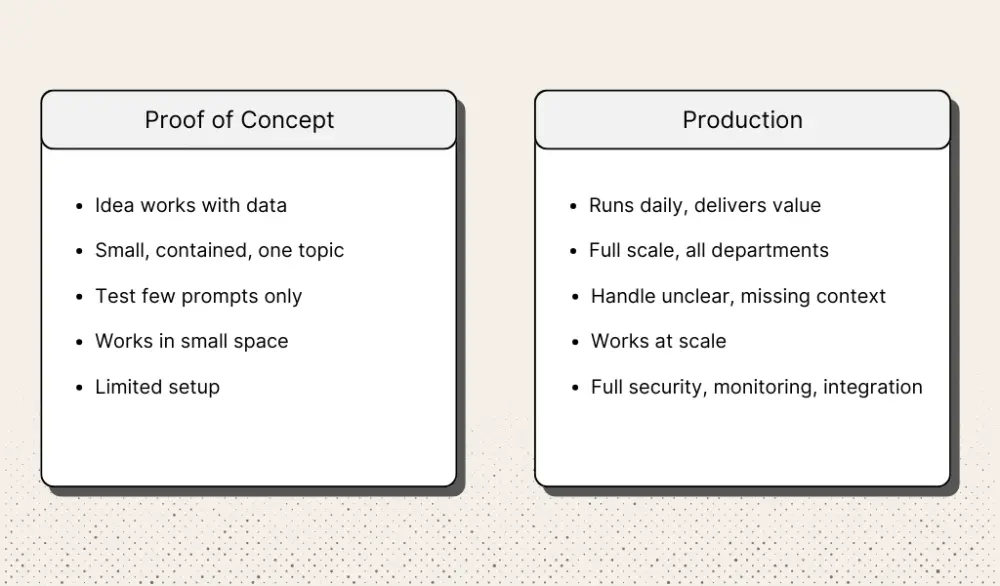
In a PoC, everything is small and contained. You pick one topic, say PTO policy, pull a small batch of documents, and have an engineer connect a model to test a few prompts. A few HR teammates try it. If the bot handles that narrow use case well enough, the PoC has done its job.
Production is a different build entirely. Now the assistant has to handle questions from every department. It must deal with unclear wording, missing context, and the full messiness of how people ask questions. It needs proper login, permissions, logging for audits, monitoring to catch answer-quality drops, and alerts when something breaks. It also has to fit your security rules and connect cleanly to your HR tools, ticketing system, and internal knowledge base. The quick PoC code can’t support any of this (which is the core difference between a quick ChatGPT-style demo and a full AI product).
The metrics shift in the same way. In a PoC, you care about small tests: “Were most answers acceptable?” or “Did the pilot group find this helpful?” In production, leaders want to know whether the assistant reduces HR tickets, speeds up response times, lowers error rates, or saves hours across the company. Those are practical AI ROI metrics for tech leaders.
The people involved change too. A PoC might be handled by one engineer and a project lead. Production requires IT for deployment, security for compliance, operations for monitoring, and business owners who track KPIs. Each group adds requirements a PoC never had to meet.
In short, a PoC proves the idea can work in a small, safe space; production proves it can work every day, at your actual scale, and deliver results you can measure.
From Concept to Production: How Do Projects Evolve in Reality?
Picture a large hospital like Mayo Clinic. The billing department wants an AI assistant to help staff answer insurance questions while they work on claims. The first version is a true proof of concept. It runs on one laptop, uses 50 clean policy PDFs, and shows that the assistant can answer a narrow set of insurance questions.
That PoC is not production. It’s only the starting point. Before the hospital can rely on the assistant in daily billing work, the team has to prove it works on messier data, define the rollout, design the real system, and test it under normal use. In this six-step path, the original demo is the PoC, steps 1 through 5 are the move from PoC toward production, and step 6 is where production use begins:
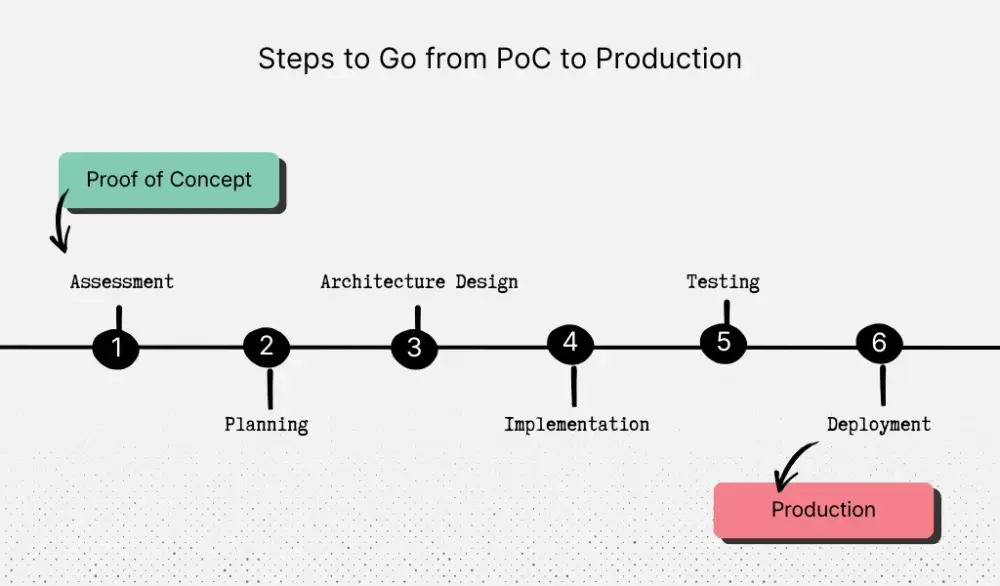
1. Assessment
Assessment is the first gate after the POC. It checks whether the assistant can handle the same messy files and questions staff see in real billing work.
IT loads 800 policy files from three insurers, including scans, old versions, and files with missing pages. For one week, 10 billing specialists use the assistant on live claims and also check answers in the policy. They log each question, the assistant’s answer, and the correct answer. If accuracy is at least 80% and most replies arrive in under five seconds, they move forward.
2. Planning
Planning starts the transition from a successful PoC to a defined production project. It turns the idea into a project with fixed scope, dates, and success metrics.
The billing director, head of IT, and a compliance officer agree that phase one will cover questions about CT scans, MRIs, and physical therapy for those three insurers. The pilot group will be 20 billing staff in the central office. They set goals of 90% correct answers, answers in under three seconds, and 30% less lookup time within three months, then write a short plan with data access rules, budget, and start date.
3. Architecture Design
Architecture design maps what the production system needs that the PoC never had to handle.
Engineers design a secure document store for policy files, with encryption and access logs, and set up sign-in so only billing staff with hospital accounts can use the assistant. They also build a small web page where a supervisor uploads new policy files and sees which ones are active and when each was updated. If the assistant cannot find a clear answer, it must say so instead of guessing.
4. Implementation
Implementation builds the production version in small, controlled slices rather than launching it to everyone at once.
In week one, IT loads only CT scan policies from one insurer. Five billing specialists use the assistant for one hour a day and keep a simple log of question, assistant answer, and correct answer. Engineers review the log daily and fix mistakes or slow responses. When CT scans work well, they add MRIs, then physical therapy, then policies from the other insurers, always using the same small-group trial.
5. Testing
Testing is the final gate before production. It checks whether the system hits the agreed goals under real, full-day use.
For one 30-day billing cycle, the 20 pilot staff use the assistant on every coverage question but keep the manual lookup process as backup. When an answer looks wrong or unclear, they flag it and paste in the correct policy text. At month-end, leaders pull totals for questions, model accuracy, speed, and minutes saved per claim and only approve rollout if the numbers meet the plan.
6. Deployment
Deployment is where production begins. The assistant now moves from a controlled pilot into daily use at the actual staff scale.
First, the hospital adds the rest of the billing staff in the main location. They attend one 60-minute training session where they practice with real claims from the previous week. For the next month, IT checks a dashboard each morning that shows number of questions, error counts, and slow replies. If accuracy and speed stay at or above the agreed levels, the hospital repeats the same rollout pattern in other sites in its network.
Critical Success Factors and Common Failure Points
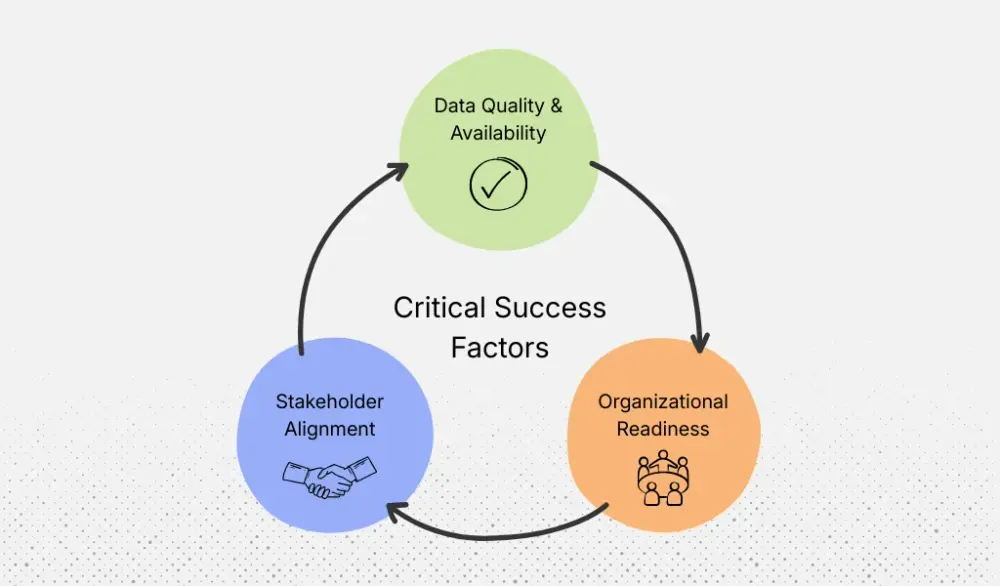
That six-step path from concept to production looks simple when you read it. In real hospitals and banks, it works only if a few things go right. In our Mayo Clinic example, three factors decide whether the insurance assistant becomes part of daily work or quietly dies after the pilot:
- The data it reads
- How people and processes change
- How well leaders stay on the same page
Data Quality and Availability
In the PoC, one analyst picked 50 clean policy files. In production, the assistant has to read from shared drives, scanned folders, and older systems. If those places are messy, the assistant will give bad answers or no answers at all.
In the healthy version, the IT data team does a real clean-up before anyone builds new features. They list all the folders where policy files live. They remove old versions, fix broken files, and choose one main “home” for each insurer’s policies. They also write down who can upload new files, where those files go, and how often updates should happen.
In the unhealthy version, the team skips this clean-up. They plug the assistant into the same messy drives people already complain about. A month after launch, a billing coder sees the assistant quoting a policy from two years ago. Word spreads. People stop trusting the tool. The model didn’t really fail; the data setup did.
Organizational Readiness
Even if the assistant is accurate, it won’t help if the people who should use it don’t change how they work.
In our hospital example, billing supervisors treat the assistant like a new way of doing insurance checks. They invite lead coders and senior billers into the pilot. Those people try the assistant, call out confusing answers, and then see those fixes show up in the next version. The assistant opens inside the billing system they already use, not in a random browser tab that gets lost behind everything else.
Supervisors also block time for short, hands-on training sessions. Coders bring actual claims from last week and try the assistant on those. They see it save a few minutes here and there. That early win makes them more likely to keep using it.
When this goes badly, the “rollout” is a single email: “New AI tool is live, please start using it.” No training, no change to the workflow, no coaching. Coders and analysts still have daily quotas and tight call times, so they stick with the old way. Usage stays low. A few months later, leaders say, “Guess AI wasn’t worth it,” even though they never gave it a fair shot.
Stakeholder Alignment
From PoC to production, many groups touch the assistant: billing leaders, IT, legal and compliance, security, and sometimes finance. If these groups are not aligned, the project slows down or drifts off track.
When it works, one person clearly owns the project, often the billing director or a program lead. Every two weeks, they send a short update: what got done, what got tested, what problems showed up, and what’s next. If the pilot group sees a spike in wrong answers after a policy update, that shows up in the update right away. Senior leaders can then decide: pause rollout, fix the issue, or adjust the plan.
When it goes poorly, no one feels in charge. IT adds features because “someone from billing asked.” Billing leaders assume compliance has already approved things. Compliance thinks the tool is still in a small test. Senior leaders hear nothing until something breaks in production. At that point, they often pull support just when the project needs help the most.
Bottom line: clean, reliable data; real changes to how people work; and steady, simple communication between named leaders are what turn a good PoC into a tool people actually use. Miss any one of these, and even a strong model will struggle to deliver the business results you hoped for.
Industry-Specific Considerations and Regulatory Requirements
Everything so far has focused on a hospital. The same six-step path also works in banking, retail, and manufacturing, but the rules and risks change a lot as AI adoption patterns differ by industry. Mayo Clinic, Capital One, and Target are not playing the same game when they push an AI project past the PoC stage.
Here’s how the bar shifts in three common sectors:
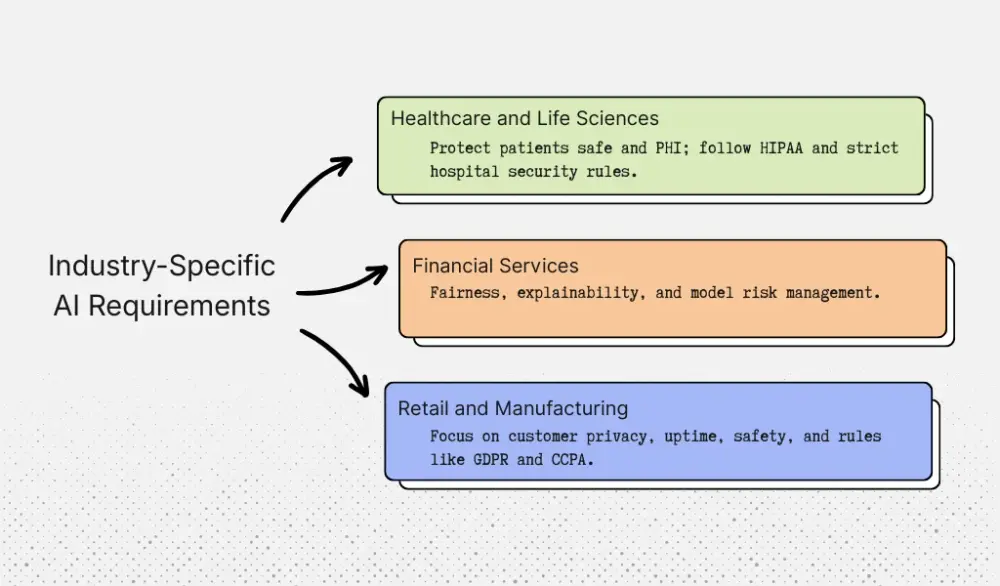
Healthcare and Life Sciences
In healthcare, the first questions are often: Does this keep patients safe? Does this protect PHI?
When AI helps read images or make diagnoses, regulators can treat it as “software as a medical device.” For example, the IDx-DR system for diabetic eye disease went through clinical trials and a special FDA review before becoming the first fully autonomous diagnostic AI cleared in the U.S. More recent tools, like Mayo Clinic’s FDA-cleared echocardiography model for detecting amyloid buildup, follow a similar path and are rolled out only after careful validation in multiple centers.
That kind of process can easily add 6–18 months and a dedicated budget on top of normal engineering.
Even when an AI tool just helps with billing or operations, it still has to follow HIPAA and strict hospital security rules. That shapes decisions such as where you store embeddings, how you log questions and answers, and who can see those logs.
So during the PoC, leaders should already decide:
- Will this ever touch diagnoses, imaging, or treatment?
- How will we keep PHI out of the wrong place from day one?
Financial Services
Banks and lenders care most about fairness, explainability, and model risk.
U.S. banks are expected to follow the Federal Reserve’s SR 11-7 guidance on model risk management. It calls for full documentation, independent validation, and strong governance for any model that influences lending, fraud, or capital.
In practice, this means a fraud or credit AI model needs:
- Clear owners and model documents
- Versioned models and stored prompts
- Regular back-testing and monitoring
- A simple way to pause or roll back the model if it drifts or starts treating groups unfairly
If you don’t design for those controls early, you’ll end up rebuilding the system later to satisfy risk and regulators.
Retail and Manufacturing
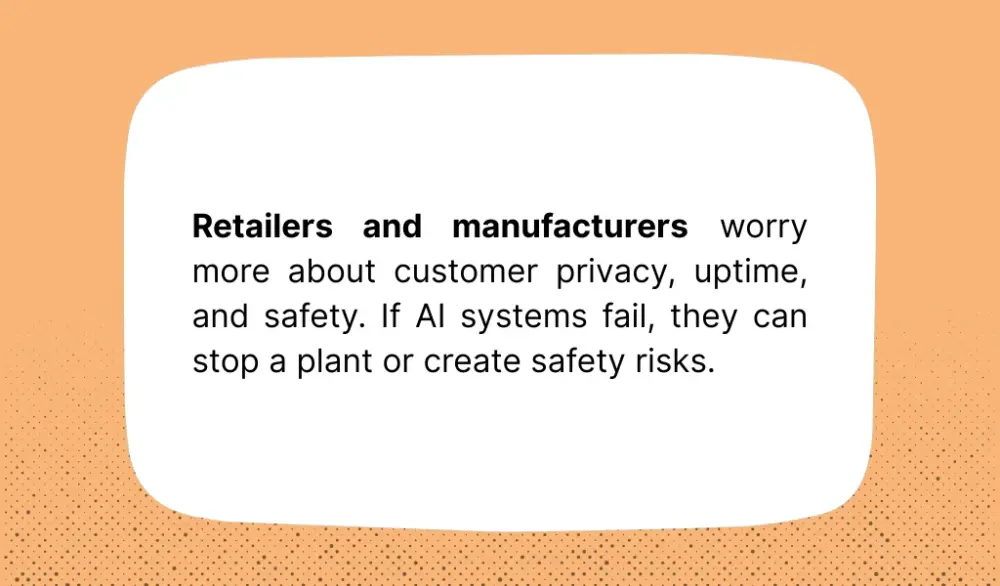
Retailers and manufacturers worry more about customer privacy, uptime, and safety.
At Target, AI systems drive billions of product recommendations across the website, app, and stores, generating billions of dollars in demand. That kind of personalization runs on purchase history, click data, and sometimes payment details, so rules like GDPR, CCPA, and card standards shape how long you keep data and who can access it.
In manufacturing, companies like General Motors use AI-driven predictive maintenance to watch sensors on production lines and cut unplanned downtime. If those systems fail, they can stop a plant or create safety risks. That’s why real-time monitoring and fallback plans are as important as accuracy.
During the PoC, teams in these sectors should already be asking:
- Can this design meet our privacy and security rules at full scale?
- What uptime and response times do our stores or plants actually need?
This is where Aloa can help. We’ve built HIPAA-compliant healthcare tools, AI workflows that pass bank model-risk review, and retail automations that respect customer privacy. When we design a PoC with you, we bake these industry rules into the plan and architecture from the start, so moving to production doesn’t mean starting over.
Key Takeaways
A proof of concept and a production build are different investments. A PoC proves the idea can work. Production proves it can work every day, at your scale, with the security, monitoring, integrations, and team adoption needed for real business results. Once your PoC succeeds, the next step is to treat production as its own project: lock the use case, define success metrics, align operations, IT, legal, and finance, and build the version your team can actually rely on.
Aloa helps companies at both stages. We can help you build the PoC that proves the idea on real data. Or take an existing PoC and turn it into a production-ready system with the workflows, integrations, and controls it needs for daily use.
We build custom AI tools, workflow automations, and internal applications in-house, so the same team can help you validate the idea, scope the rollout, and ship the next stage with less rework. Our developers include former Google and Amazon engineers, and we’ve spent eight years building software that meets HIPAA, HITRUST, and SOC-2 standards.
Book a consultation with Aloa to map your next step from POC to production.
FAQs
What is the difference between a proof of concept and production AI?
Think about the hospital billing helper from this guide. In the PoC, a few staff test the AI on a few hundred policy PDFs. In production, that same helper must handle thousands of files every month, connect to billing and EHR software, log every answer, and stay up during busy Mondays. PoC is a small test. Production is part of daily work.
In AI projects, that PoC often serves as an early MVP step because it helps validate feasibility, surface risks, and prove the workflow before you invest in the full production build. Aloa follows that same approach: start with a focused prototype, then expand into a production-ready system once the idea is validated.
How long does it take to move from proof of concept to production AI?
With a clear use case and good alignment, a proof of concept usually takes 6–8 weeks. Moving that into a production system that is stable, integrates with your software, and meets compliance often takes about 3–4 months for mid-level builds. Larger, enterprise-scale systems can take 6+ months with more complex workstreams and integrations.
How much more expensive is production AI compared to a POC?
Budgets vary by scope, but a typical PoC with Aloa is around $20K–$30K for a 6–8 week prototype. Production-ready builds usually range from about $50K–$150K, depending on integration work, monitoring, training, and documentation. Enterprise-scale projects can exceed $150K–$300K+ when multiple systems are involved.
Can a successful proof of concept guarantee production success?
No. A PoC can prove feasibility, but it doesn’t eliminate all possible edge cases or other issues that could impact the implementation's success. However, a PoC can greatly improve your chances of success. Shipping an app without any PoC involves higher risk, like building on an untested foundation and only discovering the weak spots once people start relying on it every day.
Is it better to build AI in-house or partner with an AI engineering firm?
If your developers have time to learn new AI tools and handle security reviews, you may build in-house and follow a structured AI learning path for engineers and leaders. Many directors see their developers already busy with core products. In that case, a partner helps you move faster with less risk.
Aloa can support both stages, from a focused proof of concept to a production-ready build. We build custom software and AI solutions with a small, senior team, using a hybrid pricing model that gives companies enterprise-quality execution at a fraction of traditional consulting costs. Whether you need a working prototype to validate the idea or a full implementation with integration and launch, Aloa can help you move faster with less risk. Discuss your AI project with Aloa to map the right next step.