

Most AI projects fall apart because the system pulls the wrong information. Maybe a chatbot shows the wrong policy. Or search hides the file everyone needs. Even RAG setups break when retrieval is off. All of that traces back to one thing: how your system turns text and other data into numbers.
That's where vector embedding models matter. They shape how your AI reads, stores, and matches meaning.
At Aloa, we build custom AI systems to keep that retrieval step from breaking. We work end-to-end with your team to clarify goals, prototype quickly, and ship retrieval pipelines and embedding setups that return accurate matches and fit cleanly into your existing operations.
This guide explains how vector embedding models work, the main types you'll see, and the trade-offs that show up once you build with them. By the end, you'll have a clear sense of how to pick an embedding approach that supports your RAG workflows, semantic search, or internal tools without adding extra complexity.
TL;DR
- Most AI issues come from bad retrieval, not bad LLMs. Vector embeddings decide whether your system pulls the right info or the wrong document.
- Embeddings turn text, images, and other data into numbers that show meaning, which powers semantic search and RAG.
- Good preprocessing, strong embeddings, and clean retrieval matter more than model size. Hybrid dense + sparse search works best for enterprise data.
- Common uses include RAG for internal knowledge, semantic search, recommendations, and anomaly detection.
- Aloa designs, tests, and ships full embedding-powered systems, from model evaluation and retrieval design to production-ready deployment.
How Do Vector Embedding Models Work?
In large language models, vector embedding means turning text into vector representations, which are lists of numbers that show semantic meaning. The model gives each sentence a position in a shared space, like coordinates on a map. Close points mean similar ideas. This helps the system compare queries and documents based on meaning rather than just exact words.
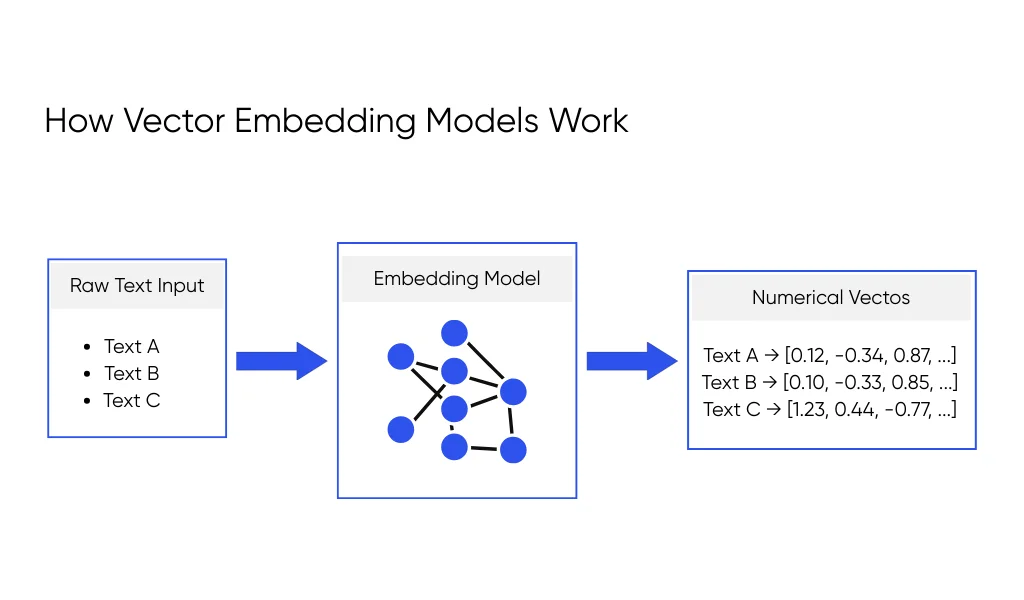
Vector Embedding Visualization
An embedding model takes your data and turns each item into a vector, which is just an array of numbers. You can picture your data as dots on a map, where distance tells you how similar two things are. Two refund emails sit close together, while a sales deck lands far away That mental map is a basic vector embedding visualization: similar content clusters together, and unrelated content sits farther apart.
The steps before this conversion matter a lot. Tokenization breaks text into pieces the model can read. Chunking splits long content into smaller blocks, like turning a 50-page policy PDF into sections by heading. When you skip this work, you end up with vectors that mix topics and confuse search later. IBM describes this process as building numeric versions of meaning that a deep learning neural network can compare across different types of data, like text or images.
Imagine your company handbook, your Jira tickets, and your support emails. You clean them, split them into clear chunks, and embed each chunk. Now “How do I refund a client?” can land near refund policy chunks and past refund tickets, instead of a random page in the handbook.
Similarity Search in Action
Once your data sits in vector form, you can run vector search, a type of similarity search used for modern information retrieval. The user query becomes a vector. Every stored chunk is also a vector. The system looks for the ones closest to the query in that shared space.
Take a support agent who types “travel reimbursement rules” into an internal tool. The system embeds that question, then pulls the closest chunks, like the “Travel Expenses” section of your finance policy and a past ticket about flight refunds. Those chunks go into your RAG pipeline, and the large language model uses them as context to build a grounded answer.
When this search step performs poorly, you feel it right away. The model looks polished but quotes an outdated policy, or it answers from an unrelated document. In most RAG audits we run, the core issue isn’t the model. It’s weak retrieval caused by messy or shallow embeddings.
Dense, Sparse, and Hybrid Retrieval
There are a few ways to search across those vectors. Dense retrieval uses embeddings to capture meaning. It shines when users ask natural questions, like “how do I handle a failed payment,” and expect the system to “get it” even if they don't use exact product terms. Sparse retrieval focuses on exact matches. It works well for ticket IDs, part numbers, or strict phrases that must match word for word.
Both have blind spots. A dense search may miss a very specific phrase your legal team cares about. Sparse search can miss related content when the wording changes slightly. That's why many teams end up with hybrid retrieval. A hybrid system runs both dense and sparse search, then blends the scores so you respect meaning and exact terms together.
In day-to-day use, this might look like your internal search tool using dense retrieval to find the right topic and sparse retrieval to make sure key phrases, product names, or legal terms appear in the final hits. For a busy team, that mix often feels less “smart” and more “things finally show up when I need them,” which is the goal.
Key Types of Vector Embedding Models
Not every embedding model does the same job. Some work best on text. Some handle text and images. Others work better in one field, like law or healthcare. A simple way to think about it is: what kind of data do you have, and how special is the language in it?
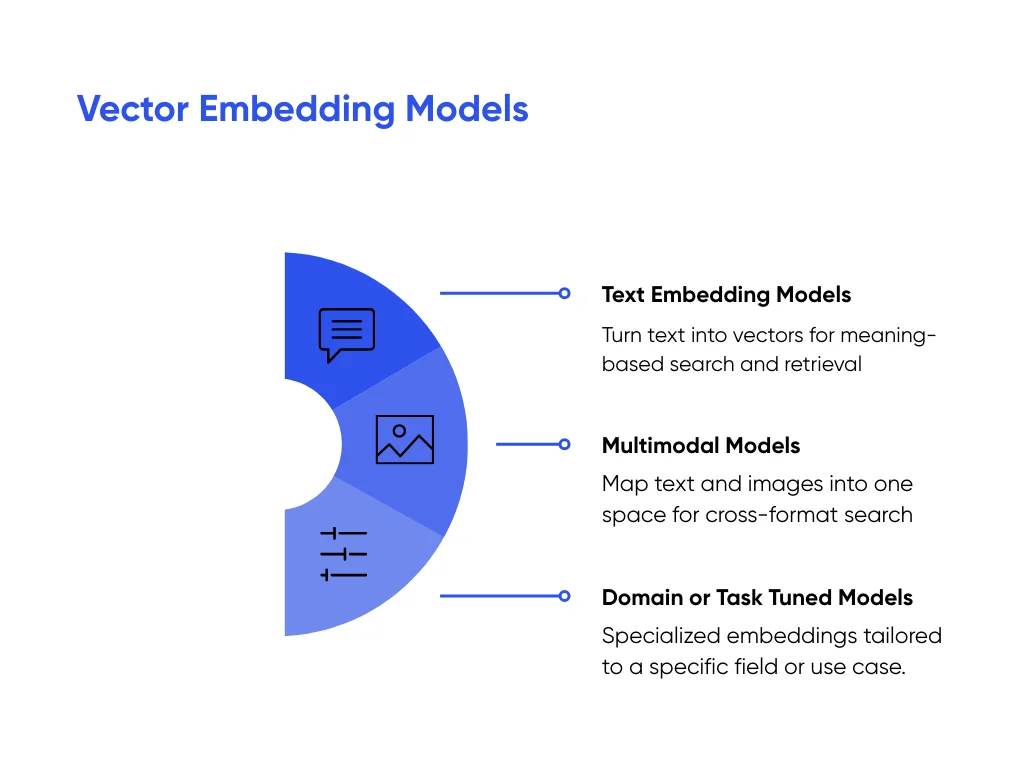
Text Embedding Models
Text embedding models are the ones you'll use most. They turn documents, tickets, chats, emails, and FAQs into vectors so your system can compare them. This powers most semantic search and RAG setups on top of your internal knowledge base.
Old word embeddings gave the same vector to a word every time, no matter the meaning of the words in the sentence. “Bank” in “river bank” and “loan from the bank” looked the same.
Modern models use context. They build sentence embeddings and document embeddings that change with the full sentence, like “refund to customer” versus “refund from vendor.” That context helps retrieval match how people read.
Most internal language projects rely on these text embeddings. That includes helpdesk assistants, internal search tools, and classic NLP tasks like sentiment analysis or machine translation.
Multimodal Models
Multimodal models handle various data types at once. They embed text and images, and sometimes other formats, into the same vector space. That shared space lets your system compare a product photo to a text query or match a scanned page to a typed search.
Think about eCommerce search. A shopper uploads a photo of a shoe. The model turns that image into a vector. It compares image embeddings with vectors for product photos and product descriptions in your catalog. The closest ones, by style or details, show up first, or best results, product images should be clean and distraction-free before indexing — a photo editor can help teams quickly enhance, crop, and polish product visuals to improve match accuracy. The same idea works for scanned invoices and contracts, where you want to match messy images with cleaner text.
The main benefit is one unified representation across formats. Your AI doesn't need a separate path for each media type. That keeps the setup simpler and still lets people search with a phrase, a file, or a picture.
Domain or Task Tuned Models
Domain or task-tuned models start from a general embedding model. Then they adapt it to a specific field or problem. The base model already understands human language in a broad way. Tuning helps it learn the patterns, jargon, and structure inside your data.
A legal AI model learns that “terminate for cause” and “end this agreement due to breach” belong near each other. A healthcare model learns that a drug name, dosage, and diagnosis should sit close in the vector space. A finance model pulls “chargeback,” “dispute,” and “fraud review” into a tight cluster.
This domain fit can matter more than chasing the biggest or newest model. If your data has unusual structure or vocabulary, a tuned model often retrieves cleaner, more relevant chunks. That gives RAG answers that sound like your tickets, case notes, or contracts, not generic text from the open web.
Popular Vector Embedding Models and Providers
When you choose an embedding model, you decide how your ML algorithms will work every day. Some options let you plug in an API key and ship fast. Others give you more control but ask your team to run more of the stack. The right choice depends on your data, your risk limits, and how much you expect usage to grow.
Proprietary API Providers
Proprietary APIs keep things simple. OpenAI, Cohere, AWS, Google, and Anthropic let you send text in a request and get vectors back. They run the GPUs, handle scaling, and roll out updates. You spend your time building features, not managing servers.
This setup works well when you add an RAG search box to your help center or upgrade your internal wiki search. A developer calls the embedding endpoint, stores the vectors, and gets basic semantic search running in a few days. Most guides highlight these APIs because they let teams test ideas quickly without heavy setup.
But you trade some control for that convenience. You accept the provider’s pricing, limits, and regions. Some data leaves your environment, even if you scrub names or IDs. That usually works for public docs and early experiments. As volume grows or your legal team raises the bar, you may want more control.
Open-Source and Self-Hosted Models
Open-source models like BGE, GTE, E5, Nomic, and Jina give you that control. You run them in your own cloud or data center. You decide where data lives, how long you keep logs, and when to upgrade the model.
This path fits teams with large or sensitive workloads. A bank that embeds millions of transactions per day often wants everything inside its virtual private cloud (VPC). A hospital group may want RAG on clinical notes without sending anything to an outside API. MongoDB notes that running models close to your data can help with both cost and compliance when traffic gets heavy.
You also take on more work. Your team monitors usage, plans capacity, and rolls out updates. Many teams pair self-hosted models with a managed vector database and use a detailed comparison of enterprise vector databases to choose the backend that fits their scale and budget.
Choosing the Right Model
A simple way to pick a model is through these questions:
- What domain do you work in, like support, healthcare, finance, or retail?
- How sensitive is the data you will embed?
- How fast should each search feel to your users?
- How many queries per day do you expect in the next year?
- Who on your team can own model and infra work? (Here’s a short guide on learning AI development to help sense-check your approach.)
Then build a short shortlist. Pick one or two API-based models and one or two open-source models. Run each on your own tickets, chats, and policy documents. For a set of questions, check the top results and ask, “Would my team trust this?” At the same time, track response time and estimate cost at your likely traffic.
At Aloa, we build these systems in-house for our clients. We plug each candidate model into a small test pipeline, run it against your workflows, and measure which one brings back the most useful context. Then we turn that winning setup into a production system, with the embedding model and vector database wired cleanly into your stack.
Practical Use Cases for Vector Embedding Models
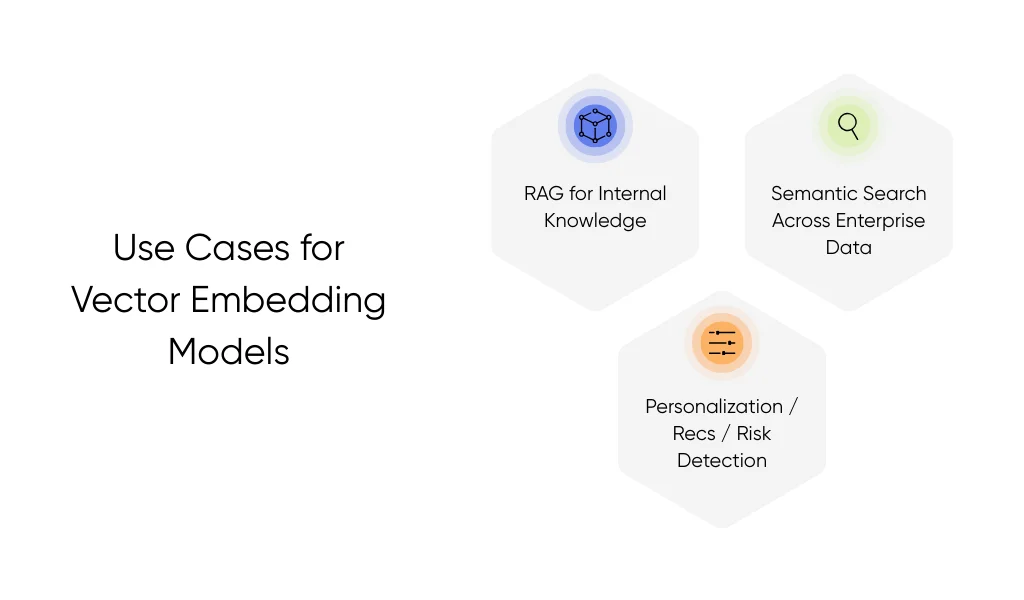
Vector embeddings show their value when your team needs fast, accurate answers from your main data sources. They help your AI understand meaning, not just match keywords. Here are the use cases where they make a clear, everyday impact:
Vector Embedding Models for RAG
RAG applications depend on good retrieval. If the system pulls the wrong document, your LLM gives the wrong answer. But when embeddings match meaning well, the model gets the exact context it needs.
A perfect vector embedding example here is an IT assistant. An employee types, “My laptop keeps freezing after the latest update.” The system embeds the question and compares it to your IT guides. Instead of guessing, it finds the update notes that mention freeze issues and feeds them to the LLM. The answer now reflects your actual fix steps, not a generic explanation.
The same pattern works across HR, finance, operations, and engineering. HR teams use embeddings to fetch policy details about leave rules. Support teams use them to pull the right troubleshooting path from hundreds of edge-case tickets. Engineering teams use them to surface internal runbooks, saving time during an outage. In each case, retrieval quality decides whether the AI feels helpful or off.
Semantic Search Across Enterprise Data
Embedding models also make search feel natural. Instead of typing the exact keywords that appear in a document, your team can ask questions the way they talk.
Say someone in ops types, “Where do I log an incident for a failed delivery?” With keyword search, they may get random results or miss the exact SOP because it uses different phrasing. With semantic search, the question embeds near the “delivery incident process” document, even if none of those exact words match.
This reduces time spent hunting through folders, old wikis, and long PDFs. Teams get answers faster, trust the system more, and avoid duplicate questions that slow down IT, HR, or compliance teams.
Personalization, Recommendations, and Risk Detection
Embeddings also help you surface similar data points or spot unusual ones.
For personalization, you can match people to the content or products closest to their interests. For example, a training platform can group courses by meaning. If an employee finishes “Intro to SOC Requests,” the system can recommend “Change Management Basics” because the vectors sit close together, even if the titles don't match.
For recommendation systems in support or operations, embeddings can match incoming cases to past cases. If a new ticket reads, “Payments stuck in pending,” the system can show the agent similar past cases and how they were solved. This cuts handle time and avoids repeated work.
For risk detection, embeddings help flag anomalies. A bank can embed transactions and compare each one to the customer’s usual pattern. If something sits far from the cluster of “normal” behavior, the system can send it for review. This works without digging into heavy rules or writing long keyword lists.
Across all these areas, embeddings help your systems understand meaning in a simple, reliable way. They make AI feel more useful because the retrieval lines up with how your team actually works and searches every day.
Key Takeaways
Your AI only works well when it can pull the right information at the right moment. Vector embeddings make that possible by turning your documents, tickets, chats, and images into numbers the system can compare. Essentially, your vector embedding model makes sure that RAG answers are accurate.
Now grab a small set of everyday questions from IT, HR, or support. Run them against your actual docs and see which model brings back context that makes sense. This gives you a clear, grounded way to choose what works instead of relying on generic rankings.
If you want help turning that test into a working system, Aloa can support the full build. We evaluate models, design the retrieval flow, and deploy embedding-powered tools that fit smoothly into your stack. If you're ready to explore real use cases or start a prototype with your own data, reach out to us.
FAQs About Vector Embedding Models
What is a vector embedding in simple terms?
A vector embedding is a list of numbers that stands in for your data. It turns a sentence, image, or record into an array of numbers that capture meaning. If two things mean almost the same thing, their number lists sit close together. That makes it easier for your system to find related content, even when the wording is different.
How do I know if bad retrieval or hallucinations are caused by my embeddings?
Look at what the system retrieves before the LLM answers. Take a few questions, log the top 5 chunks, and read them. If those chunks feel off-topic or miss key details you know exist, your problem likely sits in chunking or embeddings, not the LLM. Clean up the chunks, update the embedding model, and check whether the retrieved context improves.
If your team needs to build confidence in spotting these issues, you can point them to beginner-friendly courses that build practical skills fast.
Do I need to train my own embedding model, or are off-the-shelf options enough?
Most teams do well with off-the-shelf models, especially when leaders also invest in business-focused AI courses. General text or domain-tuned models usually handle support tickets, HR questions, IT issues, finance docs, and basic product content. Training your own model only makes sense when your data uses very tight, unusual language, like legal contract clauses or structured clinical notes, and off-the-shelf models keep missing key links.
Which matters more for RAG performance: my embedding model or my LLM?
In many setups, retrieval matters more. If your system pulls the wrong chunks, even a top-tier LLM will give weak answers. A solid embedding model, clear chunking, and a stable vector database often give a bigger boost than switching to a larger LLM. That's why a lot of RAG tuning work starts by fixing retrieval and only then revisits the model.
Is it safe to generate embeddings for sensitive or regulated data?
It can be, but you need the right setup. Calling a third-party API means some data leaves your environment, even if you mask names or IDs. Running an open-source or self-hosted embedding model in your own cloud keeps data inside your VPC, which can better support healthcare, finance, or other regulated use. Many teams choose that path so patient records, transaction logs, or internal investigations never leave their own systems.
What does a complete embedding-based system look like in production?
A typical system cleans and chunks your data, turns each chunk into an embedding, and stores those vectors in a vector database. When a user asks a question, the system embeds the question, finds the closest chunks, and passes those into a RAG pipeline with the LLM to build the final answer.
If you want help designing and shipping that full flow, Aloa’s retrieval augmented generation (RAG) service can support you. We handle everything from model selection and retrieval logic to deploying an assistant that runs on your data.