
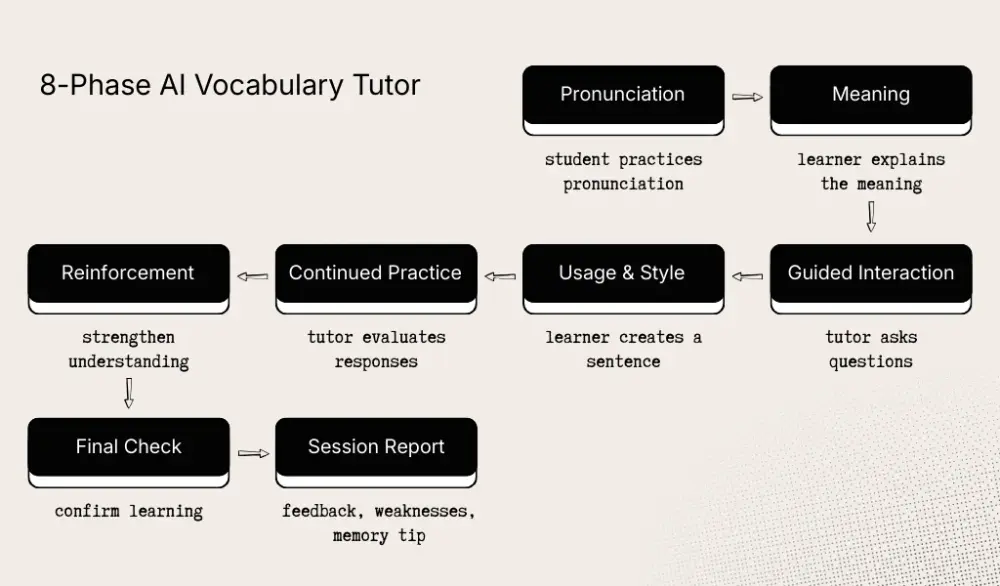
I built an AI-powered vocabulary tutor that guides language learners through 8 conversational phases, from pronunciation to a personalized session report. It runs on one LLM, one system prompt, and zero fine-tuning.
Along the way, I learned what actually works when prompting LLMs for multi-turn, stateful conversations. Here's every trick I used, why it works, and what the official docs say about it.
1. Give the model a specific identity, not a generic role
What I did:
You are a friendly AI vocabulary tutor. Be concise — short sentences, no fluff.Why it works: A persona with a defined personality (friendly, concise) produces far more consistent output than "You are a helpful assistant." The model anchors its tone, vocabulary, and behavior to this identity across all 8 phases. I also gave my tutor an internal name (you should too). Named personas drift less than anonymous ones.
What the docs say: Anthropic recommends being hyper-specific with roles. "A data scientist specializing in customer insight analysis" beats "a data scientist." OpenAI's structured prompt framework puts Role and Objective as the very first section.
2. Front-load context as a compact metadata line
What I did:
WORD: "blasphemous" | LEVEL: B1 | PHASE: 4/8 (Usage & Style)One line. The model immediately knows: what word, what student level, where in the flow. No paragraphs of context needed.
Why it works: LLMs process tokens sequentially. Putting critical context at the very top means it influences every token that follows. Google's Gemini guide specifically recommends placing critical instructions at the beginning of the prompt.
The trick: Use | pipe delimiters for inline metadata. It's more token-efficient than separate lines and reads like a dashboard header.
3. Show the full map, but only give directions for the current step
What I did:
PHASE OVERVIEW (for your context only):
1. Pronunciation — phonetic intro, student practices, score
2. Meaning — check understanding, teach if needed, score
...
8. Session Report — recap, weaknesses, memory tip, encouragement

CURRENT PHASE INSTRUCTIONS:
[only the active phase's detailed instructions]
The model sees the entire 8-phase journey but receives detailed instructions only for the current phase.
Why it works: The overview prevents the model from treating each phase in isolation. It understands what came before and what's coming next, which helps it avoid accidentally teaching content from another phase. But the detailed instructions keep it focused.
This is a form of what Anthropic calls prompt chaining: breaking complex tasks into subtasks, where each call handles one piece. I just do it within a single prompt by dynamically injecting only the relevant phase.
The trick: The (for your context only) annotation tells the model this section is background knowledge, not something to act on or reveal to the user.
4. Use machine-readable markers the model outputs and the backend strips
What I did:
- Output ===PHASE_COMPLETE=== on its own line when the phase goal is achieved.
- Output ===SCORE:N=== on its own line when scoring.
- Output ===PRONUNCIATION_SCORE:N=== on its own line when scoring pronunciation.
The backend uses regex to parse these markers, extract scores, and strip them before sending the response to the user:
const scoreMatch = content.match(/===SCORE:(\\d+)===/);
if (scoreMatch) {
  score = parseInt(scoreMatch[1], 10);
  content = content.replace(/===SCORE:\\d+===\\n?/g, "").trim();
}
Why it works: You get structured data from free-form text without forcing the model into JSON mode (which kills conversational tone). The === delimiters are distinctive enough that the model never accidentally produces them in natural speech.
What the docs say: Anthropic recommends using structured tags to separate machine-parseable output from human-readable content. OpenAI suggests Markdown for structure with XML for data handoffs. I use custom delimiters instead, which works well when you need markers inside otherwise plain-text output.
5. Write branching instructions, not linear scripts
What I did (Phase 2: Meaning):
AFTER STUDENT RESPONDS:
- If correct/close: affirm briefly, add one example sentence, mark complete
- If wrong/unsure: teach the meaning in 1-2 sentences, give one example,
  then ask "Does that make sense?" Do NOT mark complete yet.
- After they confirm understanding: mark complete
Each phase has explicit FIRST MESSAGE and AFTER STUDENT RESPONDS sections with conditional branches (if correct, if wrong, if second+ attempt).
Why it works: LLMs are very good at following decision trees when you lay them out explicitly. The model behaves more like a state machine, evaluating the student's response and branching accordingly. Without this structure, the model tends to either praise too quickly or over-explain, regardless of the student's actual performance.
What the docs say: OpenAI calls this "guided chain of thought" that outlines specific steps and decision points for the model to follow. Anthropic recommends numbered sequential steps for complex instructions.
6. Enforce hard constraints with a dedicated RULES section
What I did:
RULES:
- Stay ONLY in phase 4. Never teach content from other phases.
- Keep every response under 80 words.
- NEVER mention phases/phase numbers to the student.
- EVERY message MUST end with a clear action for the student.
- Plain text only, no markdown.
Rules are separated from instructions. Instructions tell the model what to do; rules tell it what never to do.
Why it works: When constraints are mixed into general instructions, they're easier for the model to miss. A distinct RULES: block makes them easier to follow consistently. The caps (ONLY, NEVER, MUST) aren't just emphasis. They also signal that these are non-negotiable constraints.
What the docs say: Google recommends explicitly defining constraints and limitations separate from task instructions. OpenAI's GPT-4.1 guide suggests placing critical rules at both the beginning and end of long prompts because the model can lose focus in the middle.
7. Every message must end with a call to action
What I did:
- EVERY message MUST end with a clear action for the student — either
  something to try (pronounce, write a sentence, etc.) or a prompt to
  say "ready" or "go" to continue.
Interactive phases end with a task: "Now try making a sentence!" Informational phases end with a handoff: "Say 'ready' when you're ready to continue!"
Why it works: Without this rule, the model sometimes ends on a teaching note and the student is left staring at the screen wondering "now what?" In a voice-first interface, that breaks the flow because the student may not realize it's their turn.
The trick: This is a UX rule enforced at the prompt level. The LLM becomes responsible for conversational flow design, not just content generation.
8. Use "Do NOT mark complete" as a progress gate
What I did:
- If score < 6: encourage them to try once more, do NOT mark complete yet
- If major issues: correct and ask to try again, do NOT mark complete
- After their second attempt: give feedback and mark complete
Phase completion is an explicit action (===PHASE_COMPLETE===) that the model only emits when specific conditions are met.
Why it works: Without these gates, the model tends to be too generous and completes phases after a single exchange, regardless of quality. By making it decide explicitly when to output the completion marker, and when not to, you get a more reliable multi-turn tutoring flow with room for retries.
The pattern: This works like a reward gate. The model controls the transition signal, and the prompt gives it clear criteria for when to use it. It works because LLMs are good at evaluating conditions, and the marker output is a discrete, unambiguous action.
9. Adapt difficulty through a single variable, not rewritten prompts
What I did:
WORD: "${word}" | LEVEL: ${userLevel} | PHASE: ${currentPhase}/8

// In phase instructions:
- Adapt complexity to ${userLevel} level — simpler explanations for beginners,
  more nuanced distinctions for advanced learners
- Use simple language for ${userLevel} level.
The userLevel variable (CEFR: A1-C2) is injected once and referenced throughout. The model adjusts vocabulary, explanation depth, and challenge difficulty based on it.
Why it works: Instead of writing 6 different prompt versions for 6 proficiency levels, a single variable lets the model dynamically calibrate. This works because LLMs have strong internal models of language proficiency levels. Telling it "B1" is enough context for it to know what vocabulary and grammar complexity are appropriate.
What the docs say: Google recommends labeling inputs clearly so the model understands their purpose. Anthropic's principle of being "clear and direct" extends to making variables self-documenting through naming.
10. Let the model analyze its own conversation for the session report
What I did (Phase 8):
- Weaknesses: based on the conversation, identify 1-2 areas where the
  student struggled most (low scores, needed retries, or showed confusion)
  and give a specific tip to improve each
- Memory tip: give one concrete mnemonic, association, or trick to
  remember the word
The final phase asks the model to look back at the entire conversation and synthesize insights.
Why it works: By Phase 8, the conversation history already contains all the student's attempts, scores, and corrections. The model can pattern-match across this data to identify weaknesses. It's essentially doing self-analysis on its own output. This is far cheaper and simpler than building a separate analytics pipeline.
What the docs say: OpenAI describes this as a "self-correction chain," a generate-then-review pattern. Anthropic recommends using the model to evaluate its own prior outputs for quality and correctness.
11. Stateless architecture: Send everything every time
My backend has zero session storage. Every API call includes:
{
  "word": "serendipity",
  "userMessage": "I think it means finding something nice by accident",
  "currentPhase": 2,
  "conversationHistory": [ ...full history... ],
  "userLevel": "B1"
}
The system prompt is regenerated for each request with the current phase. The client owns all state.
Why it works for prompting: The model gets a fresh system prompt tailored to the current phase on every call. That avoids stale instructions from earlier turns and keeps the request self-contained. Each prompt includes the full context the model needs to respond well.
The tradeoff: Conversation history grows with each turn. For an 8-phase tutor with retries, this can get long. Token cost increases linearly. But for a focused vocabulary session (usually under 20 turns), it's well within budget.
12. Plain text only: Resist the markdown temptation
- Plain text only, no markdown.It’s a small instruction, but it makes a big difference in a voice-first interface.
Why it works: When your output is spoken aloud via TTS, markdown artifacts ("asterisk asterisk bold asterisk asterisk") sound terrible. Even for text display, plain text with good sentence structure reads more naturally in a chat bubble than bullet-pointed markdown.
The lesson: Always prompt for the output medium. If it's a code editor, markdown is great. If it's a chat interface or voice, plain text wins.
Summary: The prompting patterns that matter
| Pattern | What it does | Why it's hard to discover |
|---|---|---|
| Named persona | Anchors tone across turn | Generic roles "work" but drift over turn |
| Compact metadata line | Front-loads context efficiently | Feels too terse, but LLMs love it |
| Full map + current instructions | Prevents phase bleed | Seems redundant but prevents confusion |
| Machine-readable markers | Structured data from free-form text | JSON mode seems easier (but kills tone) |
| Branching instructions | Turns the model into a state machine | Linear prompts seem simpler |
| Separate RULES block | Hard constraints that stic | Mixing rules into instructions seems fine (until they're ignored) |
| Mandatory CTAs | User always knows what to do | Easy to forget when focused on conte |
| "Do NOT mark complete" gates | Forces genuine multi-turn interaction | Model defaults to being too helpful |
| Single variable adaptation | One prompt covers all levels | Writing level-specific prompts seems safer |
| Self-analysis in final phase | Free insights from conversation history | Feels like asking too much of the model |
The biggest meta-lesson: prompting is UX design for AI. Every trick above is really about controlling the user experience, including pacing, clarity, difficulty, and flow, through instructions to the model. The better your prompt, the less code you need.