
I’ve noticed a pattern across both technical and non-technical folks: they often reach for small or medium-intelligence models (Claude Haiku, Sonnet 4.5, etc.) instead of the highest-intelligence models like Claude Opus 4.6. This applies across LLM families, but I'll use Claude as the example since that's what we work with most.
Why does this happen? I have a few theories:
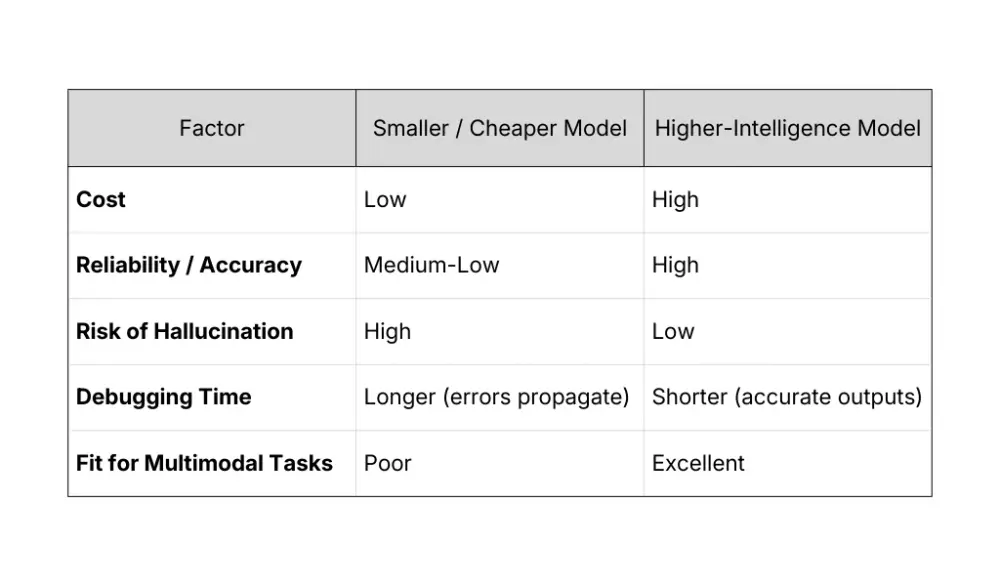
- Cost Instinct: People default to cheaper models to save money, but depending on the task, that can end up costing more if a weaker model sends you in the wrong direction.
- Tooling Defaults: When you use AI coding assistants like Claude Code or Cursor to build AI-powered features into your app, the code they generate tends to default to smaller models like Haiku or GPT 5.2 Instant for the API calls in your application. Most people don't notice or bother to override this, which means a lot of shipped AI features are running on weaker models than they need to be.
Real Example: Wrong Model = Wasted Time
I was building a medical app over the weekend that automates parts of a surgeon’s workflow. The app needed to read images, extract certain values, then run some formulas and calculations. I was using Claude Code to build this app, and I didn't realize it had set the Claude API call to Sonnet 4.5. As a result, the API response often included hallucinated values and confidently returned the wrong numbers. As soon as I changed the API call to use Opus 4.6, the results were accurate.
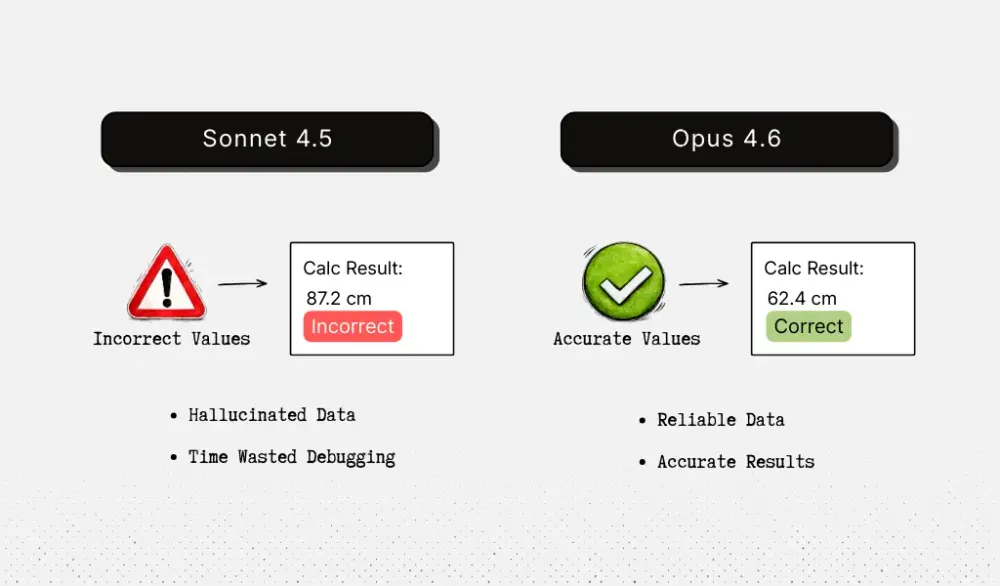
Thankfully this was just during development, but it taught me a valuable lesson that using the wrong model during dev can really slow you down or send you barking up the wrong tree. If I hadn’t noticed I was using the wrong model, I might’ve spent hours later debugging my formulas and calculations when the real issue was the model misreading the input values.
When Is a Lighter Model Fine?
To be fair, Sonnet is probably fine for general, purely text-based assistant tasks that don't need to do anything overly complex. But once you're dealing with vision, images, screenshots, or multimodal input, model intelligence matters a lot.
Other Thoughts
This same principle carries over when you're building AI features for your actual product. Since I was just testing in development, I was using the Claude API to do everything from OCR to running the calculations. In production, I probably wouldn’t use Opus alone for vision tasks, I’d use a dedicated OCR model to extract the raw text first. But even among OCR models, quality varies wildly.
One example we've seen is Mistral 25.05 getting stuck on certain phrases in documents, especially phrases involving numbers. We had a document that said Figure 1.1, Figure 1.2 and then continued with other text. Mistral kept counting from there, outputting Figure 1.3, Figure 1.4, and so on until it reached Figure 1.2000, exceeded the model’s token limits, and stopped. It completely ignored the rest of the document. But when it came to reading tables, Mistral 25.05 blew other OCR models out of the water. So you really have to think about what your use case is and find the best models for the job.
The Takeaway
If you're doing anything with AI that involves vision or multimodal input:
- Test everything.
- During development, regularly ask the AI to read back the contents of a screenshot so you can verify that it's interpreting the input correctly.
- In production, automate tests with a varied set of documents where you already know the expected output.