
I wanted to build an AI agent that could look at any codebase and tell me where the HIPAA violations are. Not a linter. Not a checklist PDF. An actual agent that clones a repo, reads every file, understands what the code is doing, and hands me a styled report with findings and fixes.
It took about 90 lines of TypeScript and a few markdown files. Here's how, and more importantly, here's what I learned about structuring agents that actually behave the way you want them to.
The Agent SDK
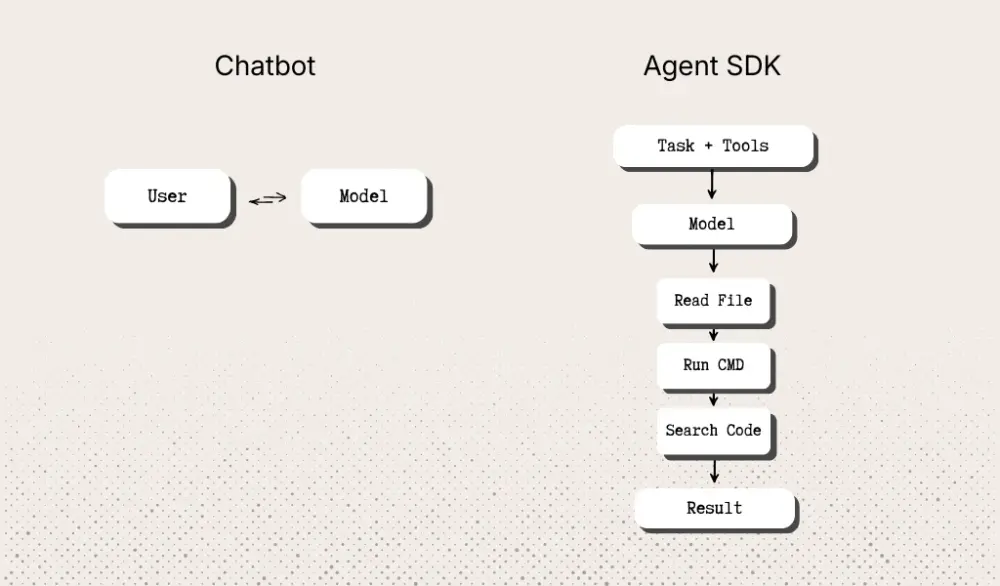
Most people interact with Claude as a chatbot. You send a message, you get a reply. The Claude Agent SDK flips that. Instead of one ping-pong exchange, you give Claude a task and a set of tools, and it figures out how to get from A to Z on its own. It reads files, runs commands, searches code, makes decisions, hits dead ends, tries something else, and keeps going until the job is done.
The entire API surface is one function:
import { query } from "@anthropic-ai/claude-agent-sdk";

const stream = query({
  prompt: "You are a HIPAA code compliance auditor. Audit this codebase: /path/to/repo",
  options: {
    allowedTools: ["Bash", "Read", "Glob", "Grep"],
    maxTurns: 100,
  },
});
You give it a prompt. You give it tools. You get back a stream of the agent working: thinking, calling tools, reading results, thinking again. No chains to define, no graph nodes to wire up, no state machines to maintain. You describe the destination and the SDK drives.
maxTurns is your budget. It controls how many tool-call round trips the agent gets before it has to wrap up. For a full HIPAA audit across a medium codebase, we use 100. Simple tasks might need 5.
The Agent
Here's the thing that surprised me most: the agent file is almost boring. There's no business logic in it. No HIPAA knowledge, no grep patterns, no HTML templates. It's just plumbing.
import { query } from "@anthropic-ai/claude-agent-sdk";
import { writeFile } from "fs/promises";

async function main() {
  const source = process.argv[2];

  const promptLines = [
    "You are a HIPAA code compliance auditor.",
    "",
  ];

  if (source) {
    promptLines.push(`Audit this codebase for HIPAA compliance: ${source}`);
  } else {
    promptLines.push("Ask the user for a local path or GitHub URL to audit.");
  }

  promptLines.push(
    "",
    "STEP 1: Use /resolve-source to resolve the source into a local path.",
    "STEP 2: Use /hipaa-code-analysis to run all 7 HIPAA audit categories.",
    "STEP 3: Use /report-html to produce the final HTML report.",
  );

  const stream = query({
    prompt: promptLines.join("\\\\n"),
    options: {
      allowedTools: ["Bash", "Read", "Glob", "Grep"],
      maxTurns: 100,
    },
  });

  let lastText = "";
  for await (const msg of stream) {
    if (msg.type === "assistant") {
      for (const block of msg.message?.content ?? []) {
        if ("text" in block) {
          lastText = block.text || "";
          if (!lastText.startsWith("<!DOCTYPE html>")) {
            console.log(`[Agent] ${lastText}\\\\n`);
          }
        } else if ("name" in block) {
          console.log(`[Tool] ${block.name}\\\\n`);
        }
      }
    }

    if (msg.type === "result") {
      const report = msg.result || lastText;
      if (report?.trimStart().startsWith("<!DOCTYPE html>")) {
        const file = `hipaa-report-${new Date().toISOString().slice(0, 10)}.html`;
        await writeFile(file, report, "utf-8");
        console.log(`Report saved: ${file}`);
      }
    }
  }
}

main().catch(console.error);
That's it. The prompt says what to do (three steps). The skills say how to do each step. The SDK handles actually doing it. Your agent code is just the kickoff and the finish line.
Skills
If the agent file is the skeleton, skills are the brain. Each skill is a markdown file that teaches the agent how to do one thing well.
skills/
├── resolve-source/SKILL.md      # Turn a path or URL into a local directory
├── hipaa-code-analysis/SKILL.md  # Run 7 HIPAA audit categories
└── report-html/SKILL.md          # Produce a styled HTML report
The format is simple. YAML frontmatter for metadata, markdown for instructions:
---
name: hipaa-code-analysis
description: Analyze a codebase for HIPAA security and privacy violations.
---

# HIPAA Code Compliance Analysis

## Pre-Analysis
Before running checks, discover the project structure...

## Audit Categories
1. **PHI Data Exposure in Logs**
2. **Encryption at Rest & in Transit**
3. **Access Controls & Authentication**
4. **Secrets & Credential Management**
5. **Audit Trail & Logging**
6. **Error Handling & Data Leakage**
7. **Data Retention & Disposal**

## Output
After all categories are analyzed, produce the HTML report using the `report-html` skill.
The agent reads this and treats it like a playbook. It follows the steps, uses the tools, and chains into the next skill when it's done. You can read any single skill in isolation and understand exactly what it does. That's the whole design goal.
You could swap hipaa-code-analysis for soc2-code-analysis or owasp-top-10-scan and the rest of the agent wouldn't change at all. The plumbing doesn't care about the payload.
Architecture Patterns
Building the agent was the easy part. Getting it to behave consistently was where the real learning happened. Claude Code gives you several layers to configure an agent's behavior, and understanding what goes where is the difference between an agent that works and one that kind of works sometimes.
For the compliance agent, three layers matter: the system prompt, the CLAUDE.md file, and skills. They all influence behavior, but they're not interchangeable. Here's how they each play a role.
System Prompt
The system prompt is the prompt string you pass to query(). It's what the model sees first, and it carries the highest weight. The model treats it as ground truth about who it is and what it's doing right now.
Here's the counterintuitive part: the highest-priority layer should have the least content.
"You are a HIPAA code compliance auditor."That's our entire identity. One sentence. When the agent is deciding whether a logging pattern is a HIPAA violation or just sloppy code, this sentence is the lens it looks through. When it's choosing between flagging something as WARN vs FAIL, this is the anchor. It shapes every judgment call across all 7 audit categories without spelling any of them out.
If you find yourself writing a 50-line system prompt with all your audit rules in it, you've mixed up identity with instructions. The system prompt says "you are a chef." It doesn't contain the recipe book.
CLAUDE.md
CLAUDE.md sits at your project root and gets loaded into context on every single turn. It's the agent's constitution, the rules that apply regardless of what skill is running or what step the agent is on.
Ours is 8 lines:
You are a HIPAA code compliance auditor. You analyze source code
for HIPAA security and privacy violations.

## Rules
- Use Glob, Grep, and Read to analyze the target codebase.
- Use Bash only for git clone/pull operations.
- NEVER modify the target codebase.
- NEVER run AWS CLI commands.
- Use available skills in `skills/` to guide your workflow.
Notice what's in here: hard boundaries. "NEVER modify the target codebase" is critical for a compliance auditor. You really don't want it "fixing" a HIPAA issue by rewriting someone's code mid-audit. "Use Bash only for git clone" keeps the agent from running arbitrary shell commands against the project. These are rules that must hold whether the agent is resolving a GitHub URL, grepping for PHI in logs, or generating the HTML report.
Notice what's not in here: the 7 audit categories, the grep patterns for PHI fields, the HTML template, the scoring rubric. All of that lives in skills.
The key insight: everything in CLAUDE.md is a per-turn tax. It's injected into every single context window, every tool call, every reasoning step. If we put our full audit checklist in here (the hipaa-code-analysis skill alone lists dozens of grep patterns across 7 categories), the agent would carry all of that overhead while doing completely unrelated work like cloning a repo or writing HTML. That's not just token cost; it's attention dilution. The more noise in the always-on context, the more likely the agent drifts from the actual task.
Skills (On-Demand)
Skills are loaded on demand. When the agent invokes /hipaa-code-analysis, that skill's full content enters the context with all 7 audit categories, PHI field patterns, framework-specific checks, and classification criteria. When it moves on to /report-html, the report skill loads with the HTML template and badge styles. The analysis skill's grep patterns aren't burning context while the agent is generating HTML, and vice versa.
For our compliance agent, this separation is especially valuable because the three skills have very different concerns:
- resolve-source cares about filesystem paths, git clone flags, and GitHub authentication. Zero overlap with HIPAA.
- hipaa-code-analysis is dense with domain knowledge: what constitutes PHI, what logging patterns to flag, how to evaluate encryption config. This is the heaviest skill.
- report-html is pure presentation: an HTML template, CSS styles, badge classes. It doesn't need to know what PHI means.
Keeping them separate means each skill only pays for its own context. The analysis skill can be as thorough as it needs to be (and it should be, compliance is not the place to cut corners) without bloating the other two phases.
Weightage
| Layer | Priority | Loaded | Sweet spot |
|---|---|---|---|
| System prompt | Highest (the model's self-concept) | Once, at start | 1-2 sentences |
| CLAUDE.md | High (always-on rules) | Every turn | Under 10 lines |
| Skills | Medium (task-specific instructions) | On demand | As long as needed |
The priority order matters when instructions conflict. Our system prompt establishes "you are a compliance auditor," CLAUDE.md says "never modify the target codebase," and the skills say things like "grep for these patterns" and "produce HTML output." If a skill ever tried to instruct the agent to edit a file in the target repo, the CLAUDE.md guardrail would override it. Put your hardest constraints at the highest level.
Commands vs Skills
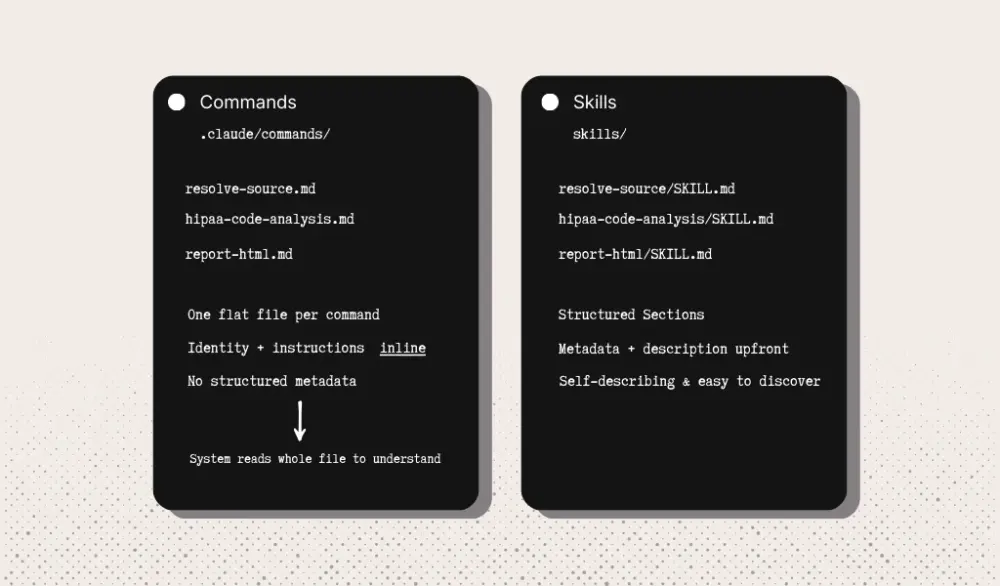
Claude Code has two ways to package reusable instructions: commands (.claude/commands/) and skills (skills/). Both teach the agent how to do something. Here's what each looks like for our compliance agent, and where they differ.
Commands are plain markdown files in .claude/commands/:
.claude/commands/
├── resolve-source.md
├── hipaa-code-analysis.md
└── report-html.md
The filename is the command name. The content is the instruction. That's the whole contract. When our hipaa-code-analysis command needed to describe itself, it had to do it inline: the first line was "You are a HIPAA code compliance auditor. You analyze a codebase at the given path..." Identity, context, and instructions all lived in one flat file. There's no structured metadata, so the system has to read the whole thing to figure out what the command does.
Skills are directory-based with YAML frontmatter:
skills/
├── resolve-source/SKILL.md
├── hipaa-code-analysis/SKILL.md
└── report-html/SKILL.md
---
name: hipaa-code-analysis
description: Analyze a codebase for HIPAA security and privacy violations.
---
# HIPAA Code Compliance Analysis
## Pre-Analysis
Before running checks, discover the project structure...
## Audit Categories
1. **PHI Data Exposure in Logs**
2. **Encryption at Rest & in Transit**
...Here's why that matters for an agent like ours:
Structure
The YAML frontmatter means name and description are explicit, parseable fields. The system knows what hipaa-code-analysis does from two lines of metadata without parsing through the full audit checklist. With commands, that description was buried in the prose. For a three-skill pipeline where the agent needs to understand what to invoke and when, that discoverability matters.
Organization
Each skill gets its own directory. Right now report-html/ only contains SKILL.md, but the format supports adding related files alongside it. If we wanted to ship example reports, reference HTML templates, or HIPAA regulation excerpts with the skill, they'd have a natural home. With commands, you get one flat file. Any supporting material needs its own naming convention or a separate directory.
Scope
Commands live inside .claude/, a dotfile config directory. Skills live at the project root in skills/. For a compliance agent, this visibility matters. When someone opens the repo, skills/hipaa-code-analysis/ is right there in the tree. They can read it, review it, understand the audit methodology. It's a first-class project artifact, not a hidden config detail. That transparency is appropriate when the output is a compliance report people are going to trust.
Identity Separation
Our command version of hipaa-code-analysis was 236 lines. It opened with identity ("You are a HIPAA code compliance auditor..."), included full context about what PHI means, listed every grep pattern, and described the output format. It tried to be everything because there was nowhere else to put things. The skill version is 34 lines. Identity lives in CLAUDE.md. The skill is just the playbook: here are the categories, here's how to check them, here's what to do with the results. That focus makes it easier to read, easier to update, and less likely to contradict the rules set at higher levels.
Running It
# Audit a local codebase
npm start -- /path/to/your/project

# Audit a GitHub repo
npm start -- <https://github.com/owner/repo>

# Interactive (the agent asks what to audit)
npm start
The agent clones (if needed), scans every file across 7 HIPAA categories, and saves a styled HTML report. Open it in a browser and you get a scorecard, code snippets with line numbers, and remediation steps for each finding. A typical audit runs 40-80 turns and costs around $0.50-$1.50 depending on codebase size.
TL;DR
- The Claude Agent SDK lets you build autonomous agents with one function call. You describe the task, it handles the loop.
- System prompt = who the agent is. 1-2 sentences. Highest priority.
- CLAUDE.md = the rules that always apply. Keep it under 10 lines. It's a per-turn tax.
- Skills = the detailed playbooks. Loaded on demand. Go wild.
- Use skills/ over .claude/commands/. The frontmatter and directory structure earn their keep.
- Your agent code should be thin. If the orchestration file is 300+ lines, you're putting domain knowledge in code that belongs in skills.
The less your agent knows at rest, the more it can focus on the task at hand.